
Summarise this article with:
Canva and Adobe Express are full design suites that need an account: Canva Pro lists at €110 a year, Adobe Express Premium at €12.19 a month including VAT. MergeImages is a free web tool with no account and no watermark, but no templates, no brand kits and no team features. Pick by the job, not by the price.
Quick Comparison Table
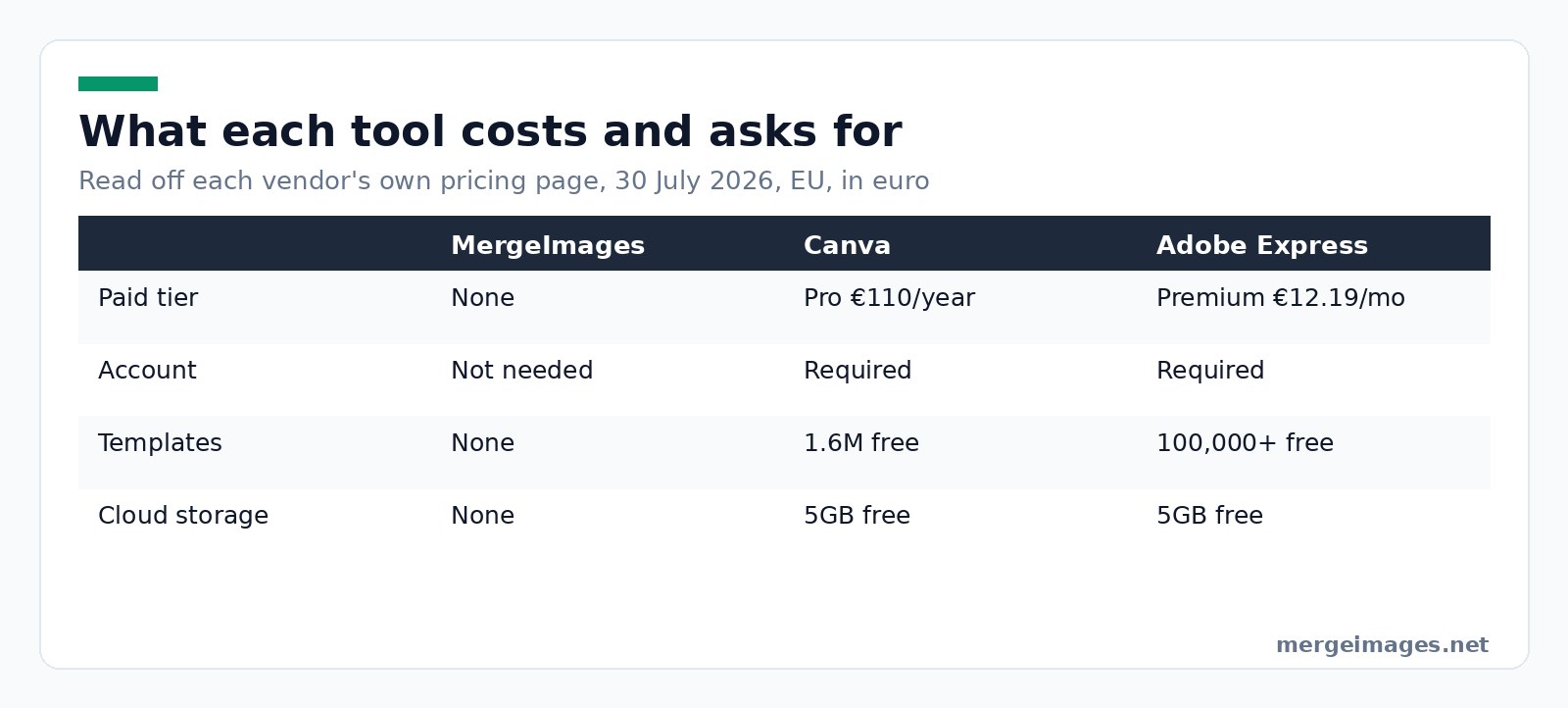
All three merge two images. What separates them is what you give up to get there: an account and a subscription on the design suites, a template library and team features on the free tool.
| MergeImages.net | Canva | Adobe Express | |
|---|---|---|---|
| Cost | Free, no paid tier | Free tier, Pro €110 a year | Free tier, Premium €12.19 a month |
| Account required | No | Yes | Yes |
| Where work is saved | Downloaded to your device | Canva cloud, 5GB free / 100GB Pro | Adobe cloud, 5GB free / 100GB Premium |
| Template library | None | 1.6M free, 3.6M with Pro | 100,000+ free, all premium on Premium |
| Brand and team tools | None | Brand Kits, teams on Business | Brand kits, business plans |
How We Compared
On 30 July 2026 I built the same thing in all three: two 1200 x 1200 product photos merged side by side, exported, no other editing. Then I read each vendor's own pricing page instead of a review site, recording plan names and figures exactly as shown to a European visitor that day.

Photo: Thirdman via Pexels
MergeImages.net
Pros
- Free with no paid tier, no trial, no credits and nothing to cancel
- No account, so nothing to sign up for and nothing to delete afterwards
- No watermark on any output, and exports as PNG, JPEG or WebP
- Around 90 single-purpose tools, including a background remover and an image upscaler
Cons
- No templates at all, so you start from a blank frame every time
- No cloud storage, no project history, no way to reopen yesterday's file
- No brand kit, no team sharing, no approval workflow, no mobile app
- Single-purpose tools mean switching pages when a job needs three steps
Best For
One clear job, done now, by one person: a before and after, a two-up product shot, a screenshot stack for a bug report. It is the wrong tool the moment someone else needs to edit the file.
Canva
Canva is a design platform where merging images is one small feature among hundreds.
Pros
- The template library is the real product: Canva's page lists 1.6M templates on Free and 3.6M including premium on Pro
- Brand Kits (1 on Free, 5 on Pro, 100 on Business)
- Cloud storage and version history across devices, plus mature mobile apps
- Team collaboration and admin controls on the Business plan
Cons
- Account required before you can export anything
- Premium templates, stock and the higher AI allowance sit behind Pro
- Heavier interface than a two-image merge needs
- Canva Teams is closed to new customers, so small teams are pushed to Business
Best For
Anyone producing a stream of on-brand visuals, especially with other people. Used more than twice a week, the subscription pays for itself in template time alone.
Adobe Express
Adobe Express is Adobe's simplified design tool, built to feed the rest of Creative Cloud.
Pros
- Free plan is genuinely usable: 100,000+ templates, 1M+ Adobe Stock assets, 4,000+ fonts, 5GB storage
- Premium unlocks all premium templates, 200M+ assets, 30,000+ fonts and 250 generative credits a month
- Brand kits, one-click resize, and a scheduler that posts straight to social accounts
Cons
- Adobe account required, and version history is capped at 10 days on Free
- Premium is billed monthly with no annual discount option shown
- The wider ecosystem is a lot of surface area for someone who wanted to merge two photos
Best For
People already inside Adobe, and anyone who wants brand consistency plus scheduling without learning Photoshop.
Privacy Comparison
An earlier version of this article said your images "are never uploaded to any server, making it the most private option". That was an overclaim about the site as a whole and it has been removed. Some tools here do send your file to our processing servers, and pretending otherwise is exactly the marketing we are trying not to do.
What is checkable: MergeImages has no accounts, so no profile, library or history is attached to you. Our privacy policy states that images handled by the AI tools are deleted after processing and are never sold, shared for advertising, or used to train models.
Canva and Adobe Express require an account by design, because the account is the product. Your files sit in their cloud (5GB on both free tiers) under their policies, which is a feature if you want work on every device and a consideration if the content is confidential.
If the material is genuinely sensitive, medical scans, legal exhibits, unreleased financials, no website is the right answer. Use an offline editor on a machine you control. That applies to us as much as to them.
Speed Comparison
From a cold start, with no existing account, MergeImages gets you a merged file fastest: open horizontal image merge, drop two files, download. Canva and Adobe Express both want a sign-up first, then a canvas size, then placement.
That gap is a first-use difference, not a permanent one. Once you are logged in and know where the tool lives, a Canva user merges two images in about as many clicks as we do. Anyone claiming a permanent 10x speed advantage is selling something.
Feature Comparison
Basic merging is a tie. Every one of the three will put two images side by side, stack them, add a gap and export.
Past that they diverge. Canva and Adobe Express give you typography, effects, animation, scheduling and a library of professionally made starting points. MergeImages gives a wide shelf of single-purpose tools instead: photo collage maker, background removal, upscaling, compression, cropping. One is a workshop, the other is a drawer of specific tools.
Pricing Breakdown
Canva
Free at €0. Pro at €110 a year for one person. Business at €170 a year per person. Enterprise is quote-only. The same page notes that nonprofits get Pro features free for one team of up to 50 users.
Adobe Express
Free at €0. Premium at €12.19 a month including VAT, billed monthly with no annual commitment, after a 30-day trial. Adobe Firefly Pro sits above it at €22.55 a month including VAT.
MergeImages.net
Free. There is no paid tier to compare, which also means no paid support queue to escalate to when something breaks.
Those figures came off Canva's pricing page and Adobe's Express pricing page on 30 July 2026, read from a European connection, so they are in euro and, for Adobe, include VAT. Check your own region before budgeting.
Our Recommendation
Choose Canva if you make visuals regularly, work with other people, or need things to stay on brand. The templates and the Brand Kit are worth more than the €110 to anyone doing this weekly, and nothing on our site competes with that.
Choose Adobe Express if you already pay Adobe, or want brand kits plus a social scheduler in one place. Its free tier is more generous than most people assume.
Choose MergeImages if the job is small, one-off and specific, and the account is the annoying part. Right tool for a quick merge, wrong tool for a design system.
Try it hereOpen the image mergerMerge two photos in secondsCombine images side by side or stacked, free, no login.
Frequently Asked Questions
Is Canva free for merging photos?
Yes. Canva's free plan includes the drag-and-drop editor and a 1.6M template library, and its pricing page does not list image merging among the premium tools Pro unlocks. You do need a Canva account, and free-plan files count against 5GB of cloud storage. Premium templates, premium stock, extra Brand Kits and the larger AI allowance are what Pro adds at €110 a year.
Does Adobe Express put a watermark on free exports?
Adobe's own pricing page does not list a watermark on the free plan. It describes Free as "basic editing tools and limited assets" with 100,000+ templates, 5GB of storage and 10 days of version history. Premium adds all premium templates, 200M+ assets and 250 generative credits a month. We could not verify any watermark claim, so we removed the one this article used to make.
Do I need an account to merge images on MergeImages?
No. There are no accounts on the site at all, so there is no sign-up, no email, no password reset and no subscription. That also means no saved projects and no way to reopen a merge later. If you want your work to still be there next week, one of the other two is the better fit.
Which tool is best for merging images?
There is no single answer, and any comparison that names one winner for everybody is not being straight with you. For repeat branded work, Canva. For an Adobe workflow or a strong free template library, Adobe Express. For one fast merge with no account, us. The right question is how often you will do this, not which tool scores highest.
Are these prices the same everywhere?
No. These figures were read from a European connection on 30 July 2026, so Canva is quoted in euro on its yearly toggle and Adobe Express in euro including VAT. Both vendors price by region and both run promotions. Treat them as a reference point and confirm on the vendor's own page before subscribing.
Where That Leaves You
Cost is the least interesting axis here. Two of these sell you a system: templates, storage, brand rules, other people in the file. The third hands you one finished image and forgets you existed. Work out which you actually need this week, then pick. If it is the quick one, the image merger and the photo collage maker are sitting right there, no account needed.

Bello builds useful software and writes thoughtful content to make sense of it all. He tests the tools himself and checks the facts before any of it goes in a guide.
Try Our Free Image Tools
Ready to Try It?
Put these tips into practice with our free online image merger. No signup required.
Try MergeImages, free


