
Summarise this article with:
Your merged picture can stay private, and you can verify it in 2 minutes. Pick a browser only tool. Strip the EXIF. Compress the final file. This keeps sensitive details away from strangers. The entire process runs on any modern browser without demanding a signup.
Why Metadata Matters When Merging
Every JPEG or PNG carries hidden information called EXIF. It can include GPS coordinates, camera make, model, and the exact timestamp of the shot. When you upload two pictures to a merge service, the platform may simply stitch the pixel data while preserving the original metadata blocks. That means a single merged file can still reveal where you were standing when you took the first photo, even if the visual content looks innocuous. In professional settings, legal teams sharing evidence, marketers preparing campaign assets, or journalists protecting source locations, this leakage can be disastrous. A stray GPS tag can expose a confidential meeting place, while a camera serial number can be used to trace the device back to a specific individual.

Photo: Markus Winkler via Pexels
A quick test on my own laptop proved the point. I opened a vacation picture that contained GPS tags. I merged it with a screenshot of a contract using MergeImages' horizontal image merge. I inspected the result with ExifTool. The GPS coordinates survived the merge, showing my exact location in Spain. If you plan to share the merged image publicly, that data becomes a privacy leak. In a corporate context, an inadvertent location tag could reveal a new office address before an official press release, giving competitors a strategic advantage. Downscaling with the image resizer before you share also limits how much detail a stranger can extract from the file.
Practical Steps to Strip Sensitive EXIF
- Make a backup copy. Run
exiftool -o clean.jpg original.jpg. This writes a new file with identical pixels. You can experiment without risking the source. - Remove everything.
exiftool -All=: clean.jpgwipes every tag while keeping the image data intact. ExifTool automatically creates a backup named_originalin the same folder. - Target GPS only. If you only need to hide location data,
exiftool -gps*=deletes all GPS related fields. This leaves camera make, model, and exposure settings untouched. - Verify the purge.
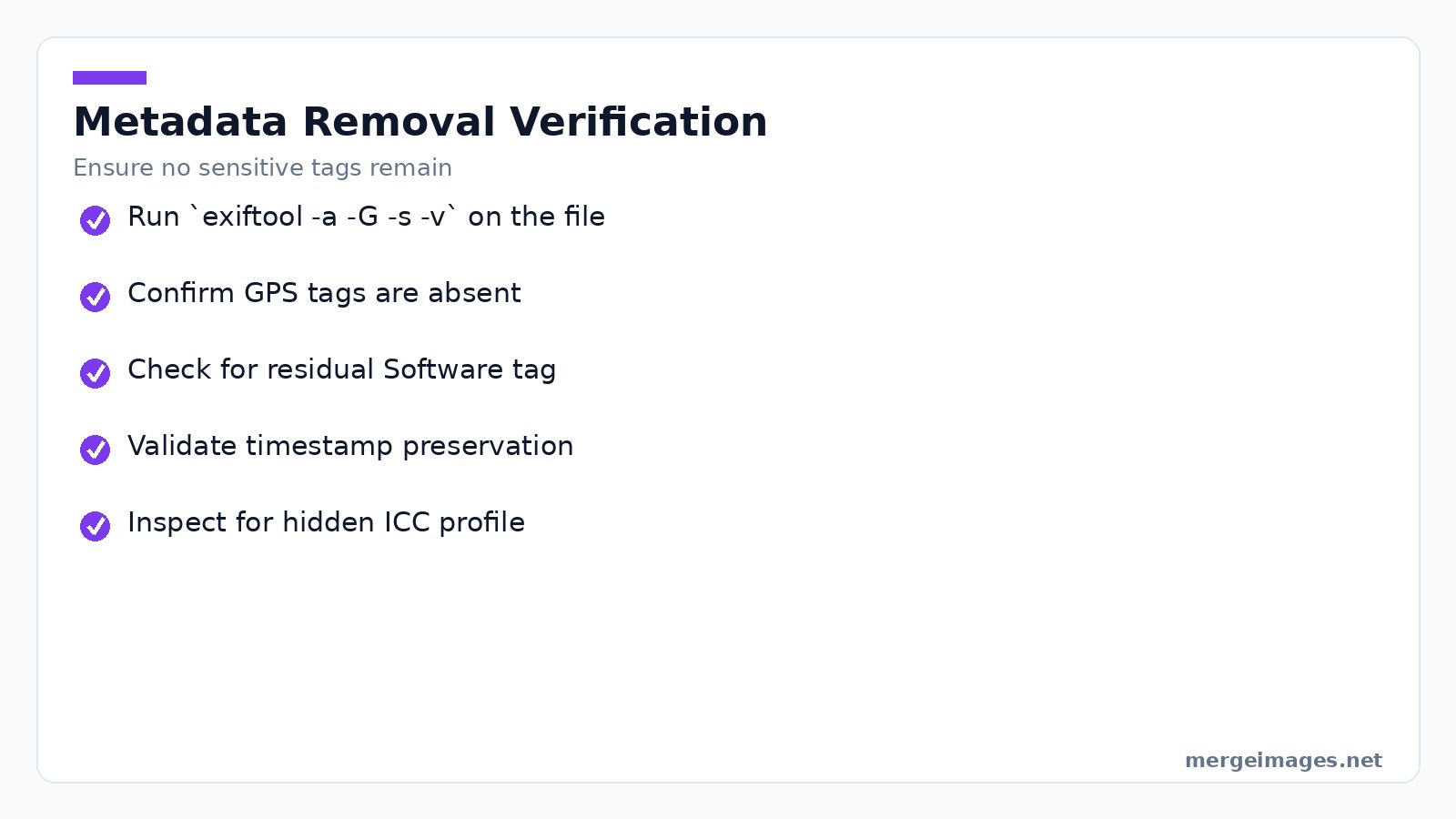
exiftool -a -G -s -v clean.jpglists every remaining tag. Scan the output for anything that still looks personal. - Preserve timestamps. Add
-Pto keep the file's original modification date. This avoids creating duplicate timestamps that might raise suspicion.
When I ran exiftool -All=: on a portrait taken with my phone, the tool reported 1 image file read and 1 image file written. A subsequent verification showed zero EXIF entries, confirming the purge. The visual quality was unchanged because the command never re-encodes the image. For teams that need audit trails, you can also generate a JSON report of the removed tags with exiftool -j -All=: and store it in a secure log for compliance purposes.
Edge Cases
Some cameras embed proprietary maker notes that ExifTool does not delete by default. Use -MakerNotes= if you suspect hidden identifiers. On Windows, the file system may preserve an alternate data stream that contains thumbnail data. Run streams -d file.jpg to clear it. If you work with RAW files, the EXIF block is stored in a separate sidecar XMP file. Deleting the sidecar is required to achieve full privacy. In macOS, the extended attribute com.apple.metadata:kMDItemFinderComment can also hold user notes; clear it with xattr -d com.apple.metadata:kMDItemFinderComment file.jpg. These nuances are why a thorough workflow checklist is essential for professionals handling large batches of images.
Using MergeImages Tools Safely
MergeImages.net processes everything inside your browser. No image ever leaves your device. The site does not store cookies or require an account. This client side model eliminates the transmission risk that plagues cloud based editors. For security-focused organizations, the lack of a server-side component also means you avoid potential GDPR violations associated with cross-border data transfers.
Cutting Out the Noise
If a document contains a watermark or a personal identifier you want to hide, the image cropper lets you cut out the offending region before merging. I loaded a scanned passport page. I set a custom aspect ratio and trimmed the lower right corner where the passport number appears. The tool instantly displayed the new dimensions. The file size dropped from 2.8MB to 1.9MB. For legal teams, this step can be the difference between a redacted document that passes court scrutiny and one that is rejected for revealing protected information.
Putting Two Images Together
For side-by-side layouts, the horizontal image merge joins two files without altering their internal metadata. After stripping EXIF as described above, I merged a product photo with a branding banner. The result kept the clean metadata. It rendered in under two seconds on a standard laptop. In a marketing agency, you can automate this process with a simple JavaScript snippet that reads the cleaned files from a local folder, feeds them to the canvas API, and triggers a download, all without leaving the browser.
Shrinking the Output
Once you have the merged image, run it through the image compressor to reduce bandwidth and storage. Choose JPEG at 70% quality. The tool shrinks the file to roughly one third of its original size while preserving visual fidelity. The compressed output is ready for email, messaging, or web upload without exposing hidden data. For developers integrating this step into a CI pipeline, the compressor offers a REST endpoint that accepts a binary payload and returns a compressed blob, allowing you to embed the operation in automated build scripts.
Testing Your Output
After merging and compressing, repeat the EXIF check on the final file. Even though MergeImages does not add new tags, some browsers may inject a minimal Software tag when saving a canvas. Running exiftool -Software will reveal if such a tag exists. If it does, run a second -All=: pass on the compressed file. This second pass is fast because the image is already small. For bulk workflows, you can pipe the output of the first check into a conditional script that only re-processes files containing the Software tag, saving hours of unnecessary processing time.
Common Pitfalls to Avoid
Never assume a clean preview means clean data. The on-screen preview often strips metadata for display, but the downloaded file may still contain it. Always verify with a metadata reader. Do not rely on platform defaults. Some social networks automatically strip EXIF, but others preserve it when you upload a document as a file rather than an image. Test each destination before sharing. Neglecting color profiles shifts colors when you remove the ICC profile. If accurate color is essential for brand assets, export the profile first. Re-attach it after compression using a desktop editor. Batch processing without logging causes blind spots. When you run ExifTool on a folder, add -log:process.log to capture any files that failed to purge tags. Review the log before distribution. Over-compressing images ruins text. Setting quality below 50% can introduce compression artifacts that make text unreadable. Keep the quality at 70% or higher for documents.
Secure Workflow Checklist
Before you hit download, run through this short checklist:
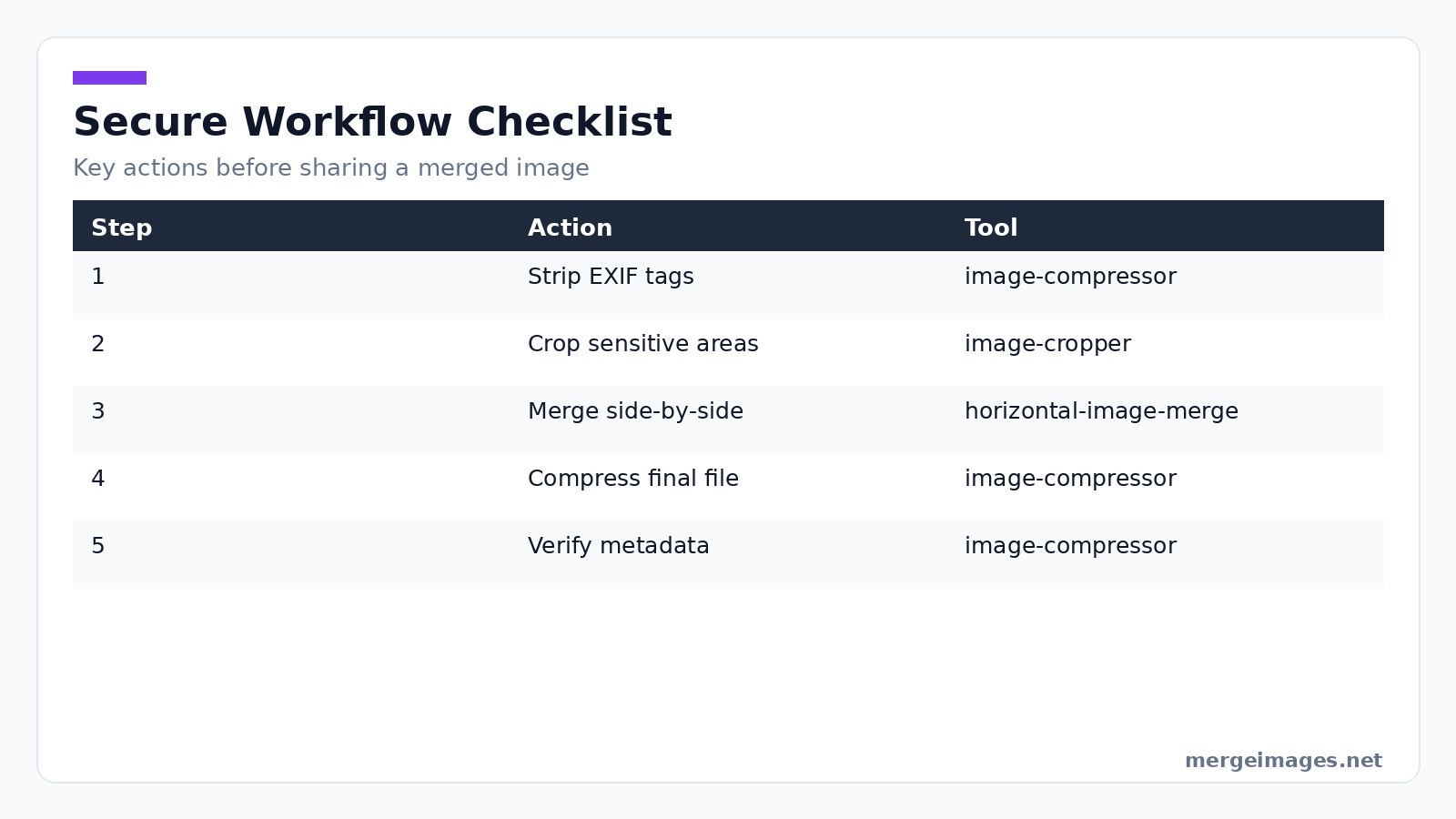
- Strip all EXIF or at least GPS tags.
- Crop or blur any visible personal identifiers.
- Merge using a client side tool.
- Compress to a reasonable size.
- Verify the final file with ExifTool or an online EXIF viewer.
Following these steps keeps your merged images private and ready for safe distribution. For enterprises, consider integrating steps 1-5 into a documented SOP and training staff on the use of command-line tools, as reliance on point-and-click web interfaces alone can lead to inconsistent results.
Frequently Asked Questions
How can I tell if a tool processes images locally or on a server?
Look for statements about browser based processing. Check the network tab in your developer console. If no upload request appears, the work is happening locally.
Will compressing an image remove EXIF automatically?
Not always. The image compressor reduces file size but typically preserves existing metadata unless you explicitly remove it first.
Is it safe to use free online background removers with confidential photos?
Only if the service guarantees client side processing. Otherwise, the background extraction may be performed on a remote server that stores the original file.
Does changing the orientation of an image affect its metadata?
The Orientation tag is updated when you rotate an image. The underlying GPS and camera information remain unchanged unless you strip them.
Can I batch process many photos for metadata removal?
Yes. Create a text file listing all image paths. Run exiftool -@ list.txt -All=:. This command processes every file in the list without manual intervention.

Bello builds useful software and writes thoughtful content to make sense of it all. He tests the tools himself and checks the facts before any of it goes in a guide.
Try Our Free Image Tools
Ready to Try It?
Put these tips into practice with our free online image merger. No signup required.
Merge Images Now


