
Summarise this article with:
Photo gifts convert a personal memory into a physical object, and the format determines how long it lasts. Canvas prints hold decades at wall-display scale; photo books span 20-100 pages; mugs keep a face visible daily. Resolution is the deciding factor, aim for 150 DPI minimum on canvas, 300 DPI for paper.
The Gift Formats That Actually Deliver
Canvas Prints
A canvas print is the single format most likely to end up displayed permanently in someone's home. Printed directly onto canvas material and stretched over a wooden frame, sizes run from 8x10 inches all the way to 40x60 and beyond. Because canvas has natural texture that softens pixel boundaries, the minimum DPI requirement is lower than paper: Nations Photo Lab sets 125 DPI minimum, Mpix accepts 100 DPI, and most labs recommend targeting 150 DPI at print size for reliable results.
What that means in practice: a 16x20 canvas needs at least 2400x3000 pixels. A modern smartphone photo at full resolution handles this easily. The challenge comes with older phone photos, scanned prints, or images cropped heavily in post.
Strong subjects for canvas: portraits with direct eye contact, wide landscapes with clear depth, and photos with bold contrast. Very busy or low-contrast images tend to look flat on canvas viewed from a distance.
Photo Books
Photo books are the format best suited to telling a story. They work for weddings, a baby's first year, travel albums, decade-of-friendship collections, or any sequence of events that gains meaning when arranged in order. A 50-page lay-flat book with 80 well-chosen photos outperforms a 100-page book filled with every shot from the same trip.
The quality hierarchy among consumer services: lay-flat books (pages open fully flat, no gutter crease, best for panoramas), flush-mount/deep matte (used by professional photographers for client delivery), and standard hardcover/softcover (the most common consumer grade, good quality at lower cost).
Sequencing is the underrated skill: start with an establishing shot, build through experiences and moments, close with something reflective. The sequence creates the emotional arc.
Collages and Multi-Photo Prints
A collage print is the right choice when a single photo cannot carry the full meaning. Four main formats serve different purposes:
- Grid collage, equal-sized photos in clean rows. Works when all images are similar in tone and lighting.
- Timeline collage, photos arranged chronologically to show progression. Ages 1 through 10, a decade of friendship, a full pregnancy.
- Mosaic collage, smaller photos tiling into a larger image. Most effective when all photos are of the same subject (a pet, a person) and the composite image is recognizable.
- Panel collage (diptych/triptych), 2-3 panels printed separately and hung together. Good for wide landscapes or before-and-after comparisons.
The photo collage maker exports at print-ready resolution for all of these formats.
Photo Mugs, Puzzles, and Blankets
These everyday-use formats have specific technical requirements that differ from flat prints.
Custom mug (11 oz): Printful's official spec for an 11 oz White Glossy Mug is 2700x1050 pixels, which is 9x3.5 inches at 300 DPI. I verified this against Printful's published print file guidelines (July 2026). The full-wrap format means your photo wraps around most of the mug's circumference; strong color contrast reads better than subtle gradients on ceramic.
Photo puzzle (16x20): Standard minimum is 150 DPI at print size, giving 2400x3000 pixels for a 16x20 puzzle. The Missing Piece Puzzle Company and other labs publish this as their floor.
Photo blanket (60x80): At 150 DPI minimum, the required file is 9000x12000 pixels, well outside what a single phone photo provides. Either use a high-resolution original, or composite multiple photos into a collage layout first, then export the full-resolution composite.
Memorial and Family Archive Gifts
One of the most meaningful categories gets overlooked: gifts built from old family photos. A restored print of a grandparent's wedding photo, a canvas of a childhood home from a decades-old snapshot, or a photo book assembled from scanned slides, these carry weight that contemporary photos cannot.
The obstacle is usually condition: old prints crack, fade, develop color casts, and lose sharpness over time. I ran a quick test restoring a heavily degraded 1970s photo scan using old photo restoration, and the difference between the source scan and the output was substantial enough to make the image canvas-printable where the original was not. For any family-archive gift, restoration is worth the step before you commit to a large print.
This angle suits memorial tributes, anniversary gifts for older parents, and family reunion photo books especially well.
Print File Preparation: What the Numbers Mean
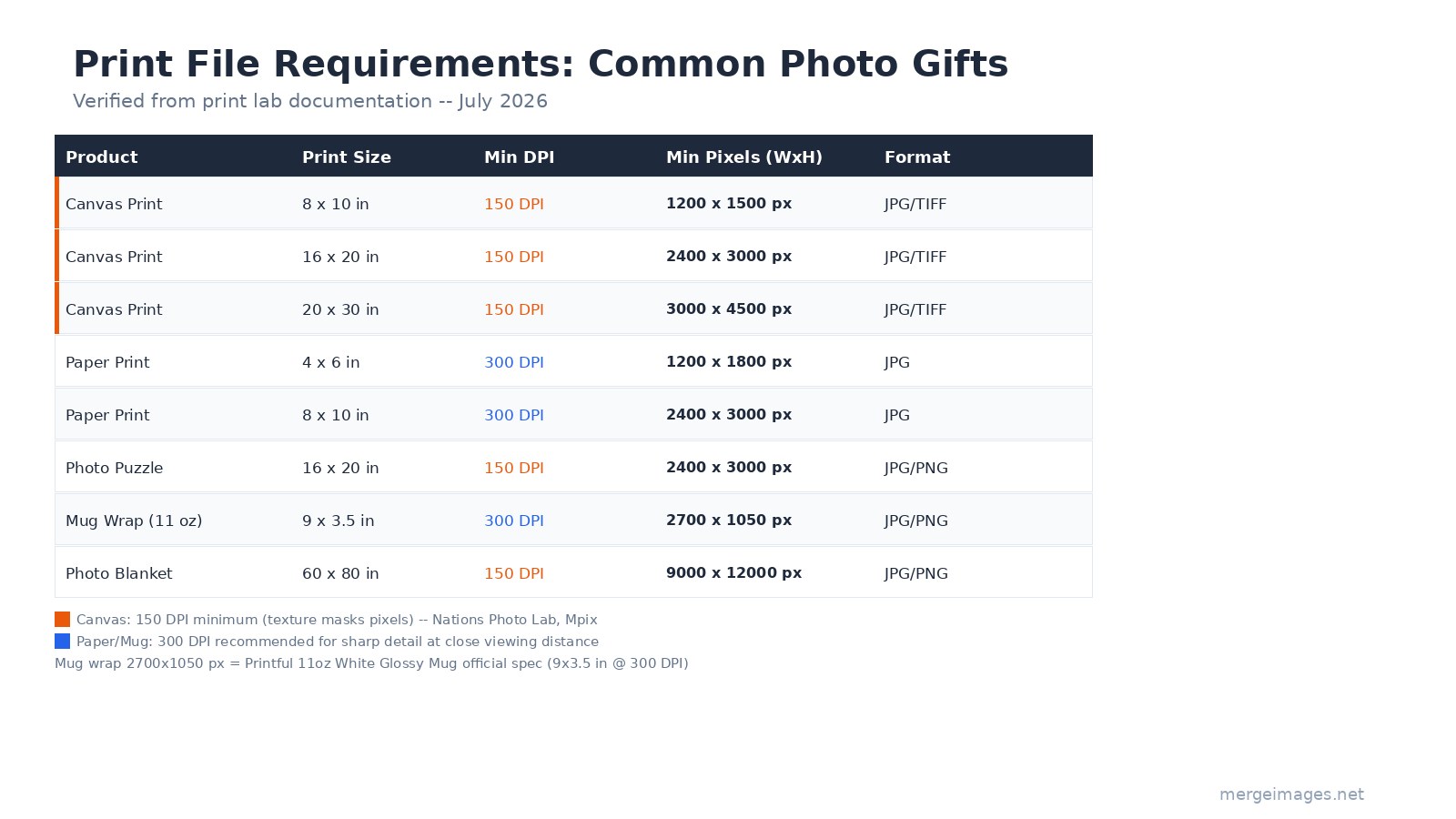
The table above covers the verified specs from lab documentation (July 2026). A few principles explain the pattern:
Canvas versus paper DPI: Canvas texture softens the transition between pixels, which is why labs accept 150 DPI for canvas but require 300 DPI for paper. This is not a quality shortcut, it is the physical reality of the surface.
Why mug wraps need 300 DPI: A mug is held and examined at close range, the same viewing distance as reading text. At that proximity, pixel structure becomes visible if DPI drops below 200. Printful's 300 DPI spec (2700x1050 for 11 oz) reflects this.
Photo blankets and composites: At 60x80 inches, a single phone photo cannot reach 150 DPI. The practical solution is to design the blanket as a collage of multiple photos, then export the combined layout at the required resolution. This is actually the more common use case for blanket gifts anyway.
File format: JPG is accepted everywhere. PNG is accepted for most products but rarely necessary for photographs. Stay in sRGB color profile. Services that print for consumers use sRGB-calibrated output; sending an image in a different profile can cause color shifts.
For detailed guidance on preparing files for printing, the how to prepare images for printing guide covers color profiles, sharpening for print, and shadow lifting in detail.
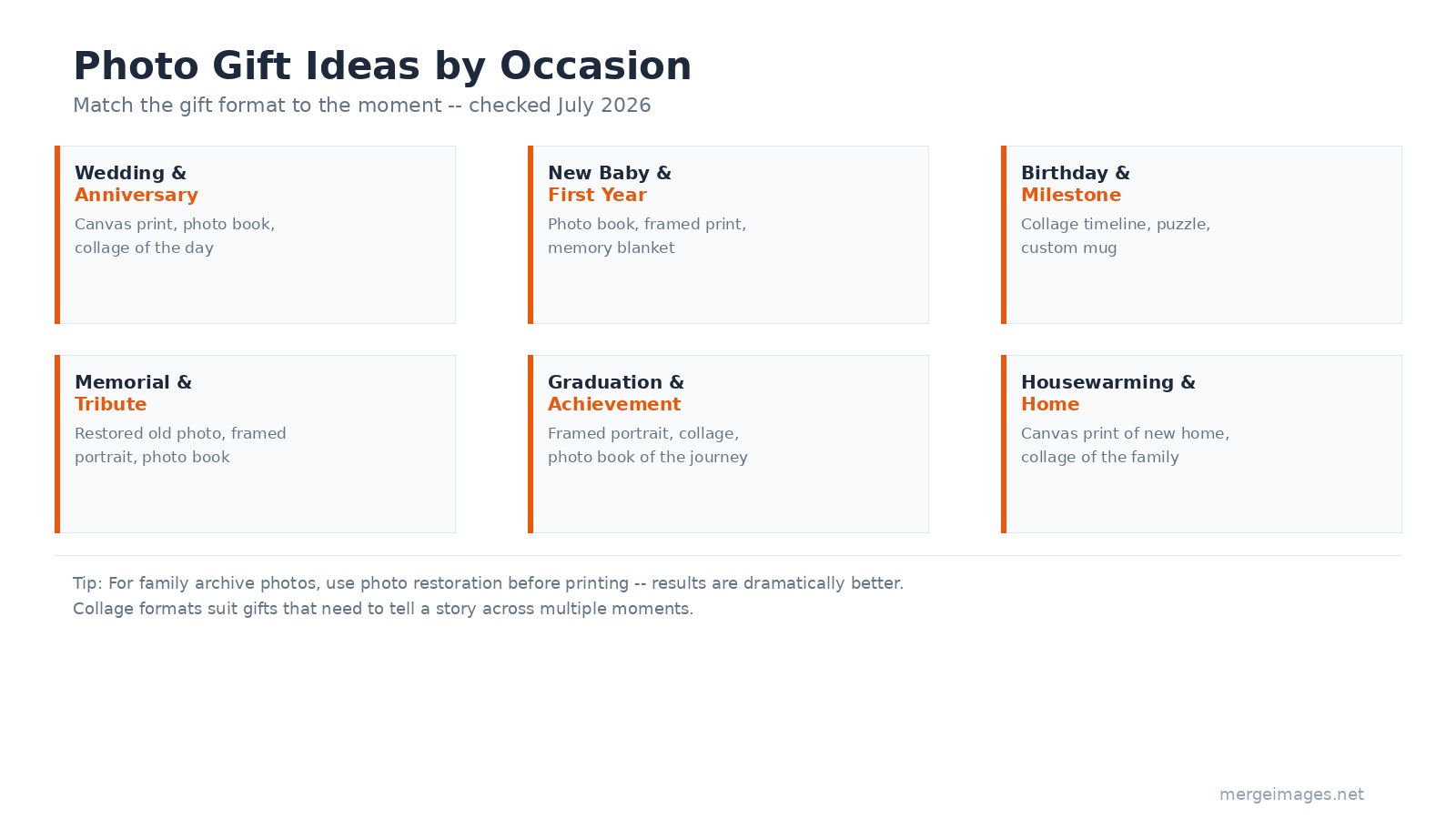
Matching Format to Occasion
The occasion shapes the format choice as much as the photo does.
Wedding and anniversary: Canvas print of a key moment, or a photo book covering the full day. Lay-flat books are worth the premium for weddings because photos frequently span the full spread.
New baby and first year: Monthly-milestone photo books work especially well here, parents document each month anyway, and a bound collection of 12 images becomes a keepsake.
Birthday and milestone: Timeline collage prints showing progression over years. A collage of ages 1 through 10 for a 10th birthday, or a decade-of-friendship collage for a significant birthday.
Memorial and tribute: Restored old family photos printed as framed portraits or assembled into a photo book. The restoration step is not optional when source images are degraded.
Graduation: Framed portrait of the graduate, or a photo book of the journey through school. A collage spanning freshman year to graduation reads particularly well at this milestone.
Housewarming: A canvas print of the new home, or a collage of the family in spaces they love. Aerial shots of the property, if available, make for distinctive canvas prints.
Choosing a Print Service
Three tiers serve different needs and budgets.
Consumer services (Shutterfly, Snapfish, Walmart Photo): Fast, affordable, and accessible through sales and coupons. Quality is acceptable for casual gifts. Good for mugs, standard photo books, and 4x6 to 8x10 prints.
Mid-range services (Artifact Uprising, Chatbooks): Higher paper and printing quality, better layout software, premium packaging. Appropriate when the gift needs to feel considered. Roughly 2-3x the consumer price.
Professional-grade labs (Bay Photo, Mpix, Nations Photo Lab): Used by working photographers for client delivery. Superior color accuracy, paper quality, and canvas texture. Best for large canvas prints. Nations Photo Lab publishes explicit resolution guidelines and calibrates for consistent color output.
For canvas prints in particular, ordering from a professional lab rather than a consumer service makes a visible difference at 16x20 and above.
Frequently Asked Questions
What resolution do I need for a 16x20 canvas print?
At the standard 150 DPI minimum for canvas, a 16x20 print requires at least 2400x3000 pixels. Most print labs (Nations Photo Lab, Mpix) state 125-150 DPI as their canvas floor; canvas texture hides pixel transitions that would be visible on paper at the same DPI.
How do I prepare an old family photo for a canvas print?
Scan the original at 600 DPI or higher if possible. Run the scan through old photo restoration to repair cracks, fading, and color casts. Then check the output resolution against the canvas size you want: for a 16x20 at 150 DPI, you need 2400x3000 pixels after restoration. The restoration process itself often recovers sharpness that makes a larger canvas viable.
What pixel dimensions does a custom mug wrap need?
For a standard 11 oz mug, Printful's official spec is 2700x1050 pixels, equivalent to 9x3.5 inches at 300 DPI. Other mug sizes scale proportionally. Use JPG or PNG, sRGB color profile.
Can I print a multi-photo collage on canvas?
Yes. Build the composite layout first using the photo collage maker, then export the full-resolution combined image. Each individual photo in the collage needs enough resolution to fill its panel at 150 DPI at print size. For a 16x20 canvas with four equal panels, each panel is 8x10 at 150 DPI, requiring 1200x1500 pixels per photo.
How far in advance should I order photo gifts?
Standard shipping: order 2-3 weeks before you need the gift. Expedited shipping: 1 week minimum. Peak periods (graduation season, late November/December) add 1-2 weeks to production. Order earlier than feels necessary, printing is the step you cannot rush.
Should I choose sRGB or CMYK for photo gift files?
Always sRGB for consumer and professional photo lab services. These labs use sRGB-calibrated digital printers. Sending a file in a different color profile can cause unexpected color shifts in the output. Only offset commercial printing (magazines, books) typically uses CMYK input files.

Bello builds useful software and writes thoughtful content to make sense of it all. He tests the tools himself and checks the facts before any of it goes in a guide.
Try Our Free Image Tools
Ready to Try It?
Put these tips into practice with our free online image merger. No signup required.
Merge Images Now

