
Summarise this article with:
Optimizing email images means keeping total size under 600 KB, using JPEG for photos, PNG-8 for graphics, and resizing to exact pixel widths. You need 600 px for full-width layouts and 270 px for columns. You must also add descriptive alt text to ensure accessibility and deliverability. Treat these numbers as hard limits, not mere suggestions.
Why Email Rendering Breaks Expectations
Many clients hide images until the recipient clicks “load images.” That default behavior forces you to convey the offer with text alone. Images also load at open time from remote hosts. A heavy file can delay the first impression. Outlook, Gmail, and Apple Mail each impose their own rendering quirks. A one-size-fits-all approach simply fails here.
Photo: Walls.io via Pexels
Picking the Right File Format
Photographs and product shots work best as JPEG. A quality setting of 70-80 % typically yields 30-100 KB files for the common 600 px width. Graphics that need transparency like logos, icons, or overlay elements should be PNG-8 whenever the color palette is limited. Save PNG-24 for complex images that truly require full color depth. You can add simple motion with animated GIFs, but keep each under 1 MB to avoid sluggish loads.
Dimensions, Resolution, and File Size Limits
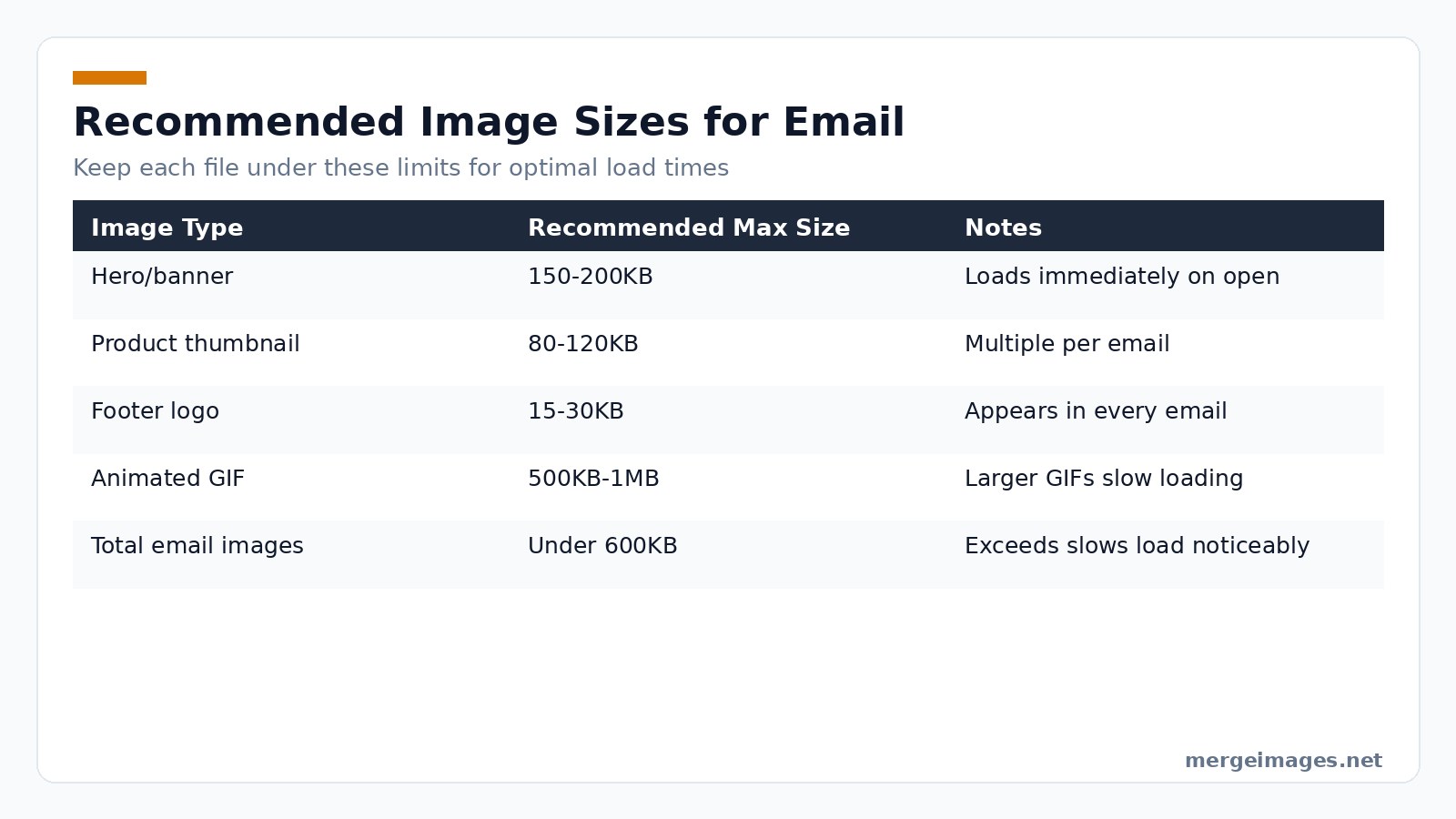
The industry standard content width is 600 px. For a single-column hero, deliver a 600 px-wide image. When possible, provide a 2x version at 1200 px for Retina displays. Two-column layouts call for 270-1280 px images per column. Screen resolution is defined by pixel dimensions, not PPI. A 600 px image displays the same size on any device. Target file sizes follow a simple rule. Keep each image well below the maximum listed in the table below. The image compressor trims bytes without visible loss, while the image resizer forces exact pixel dimensions.
Speaking Through Alt Text
When clients block images, alt text becomes the voice of your visual content. It also powers screen readers for accessibility. Write concise, descriptive phrases. A product photo gets a brief name and call-to-action. A logo receives the brand name. Decorative graphics receive an empty alt attribute.
Designing for Blocked Images
Never hide critical information inside an image. Prices, discounts, and expiration dates must appear as HTML text. Use background colors on image containers. The layout still looks intentional when the picture fails to load. Prefer HTML-styled buttons over image-based ones. They remain clickable even when images stay hidden.
E-commerce Product Image Tactics
Consistency builds trust. Choose a single aspect ratio like square, 4:3, or 3:4. Apply it to every product thumbnail. Clean backgrounds make products pop. The background remover can strip unwanted scenery in seconds. After cropping, run the images through the resizer to enforce uniform pixel dimensions across the grid.
Mobile-First Realities
More than half of email opens happen on phones. Linked images should be at least 44 × 44 px at their rendered size to be comfortably tappable. Avoid embedding long strings of text inside images. They become unreadable once the email scales down. Design single-column layouts that stack gracefully on narrow screens. Test both the desktop-wide and mobile-full-width versions.
Image-to-Text Ratio and Deliverability
Spam filters assign higher scores to messages that are mostly images. Balance each visual block with at least a short paragraph of copy. Aim for a minimum of 500 characters of HTML text in promotional emails. This practice lowers spam risk. It also improves engagement for recipients who never enable images.
Testing Your Email Images
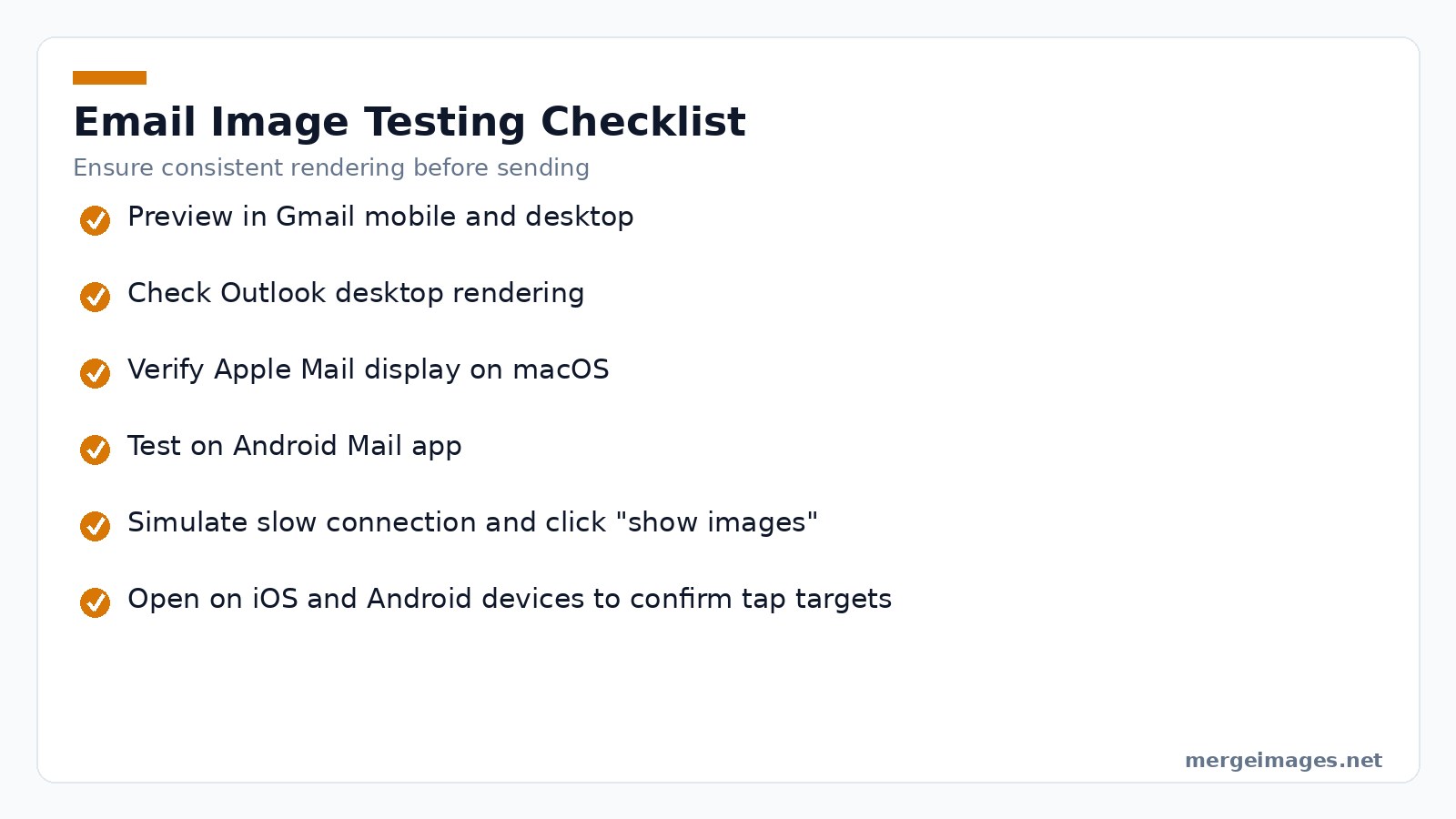
Different clients render the same HTML in unique ways. Use a preview service to see how Gmail mobile, Outlook desktop, Apple Mail, and Android Mail display your design. Simulate a slow connection and click “show images” to gauge load time. Open the email on both iOS and Android devices to verify tap targets and text readability.
Common Pitfalls and How to Fix Them
- Oversized files that slip through QA, Even a single 650 KB hero image will push the entire email over the 600 KB ceiling. Run every asset through the compressor before final assembly. If the size remains high, lower the JPEG quality in 5 % increments and re-check visual fidelity.
- Incorrect MIME type on the server, Some hosting providers serve PNG files with a generic
application/octet-streamheader. This forces some clients to treat the image as a download link. Verify theContent-Typeheader (image/pngorimage/jpeg) using a curl request. - Missing width and height attributes, When an image lacks explicit dimensions, the email client must calculate layout on the fly, which can cause content shifting after images load. Always include
width="600" height="300"(or the appropriate values) in the<img>tag. - Using PNG-24 for simple icons, PNG-24 retains full color depth but adds unnecessary bytes. Switch to PNG-8, limit the palette to 256 colors, and watch the file shrink dramatically.
- Embedding large animated GIFs, A 2 MB GIF will stall the email on a 3G connection, leading to a poor user experience and higher bounce rates. Replace long loops with a short 2-frame animation or use a static fallback image for older clients.
When Things Go Wrong in Production
During a high-volume send, you may notice a spike in open-rate drop-off. First step: pull the email’s raw source from the ESP and inspect every <img> tag. Look for broken URLs, missing alt attributes, or inline base64 strings that exceed 100 KB. Next, check the server logs for 404 or 403 responses; a blocked CDN can cause images to remain hidden for all recipients. Finally, run a deliverability test with a spam-score analyzer; a high image-to-text ratio will be flagged. Adjust the copy, re-compress the assets, and resend a small test segment before the full blast.
Advanced Tips for Power Users
If you manage high-volume campaigns, automate the optimization pipeline with a CI/CD step that runs ImageMagick or Sharp on every asset before upload. Combine lossless WebP conversion for supported clients with a fallback JPEG to cover older Outlook versions. Leverage CSS image-set() to serve WebP to modern browsers while delivering JPEG to legacy clients, keeping the overall payload under the 600 KB ceiling. Finally, monitor real-time load metrics via beacon tracking; a sudden spike in load time often points to an oversized GIF that slipped through QA.
Ready to trim your email images? Try the image compressor and image resizer now, and polish product shots with the background remover.
Frequently Asked Questions
Should I host my email images externally or embed them?
External hosting is recommended. It keeps the email size small and avoids spam triggers that base64-encoded images cause.
How can I support Retina displays without inflating file size?
Create a double-resolution version. Compress it aggressively at JPEG 65-70 % quality. Constrain it to the intended display dimensions in HTML.
Do animated GIFs affect deliverability?
The format itself does not. Large GIFs increase load time, which can hurt user experience and raise spam scores indirectly.
What is the safest format for email CTA buttons?
HTML-styled buttons are safest. If you must use an image, ensure the alt text matches the button label.
How many characters of text should accompany my images?
Include at least 500 characters of meaningful copy to keep the image-to-text ratio healthy and improve deliverability.

Bello builds useful software and writes thoughtful content to make sense of it all. He tests the tools himself and checks the facts before any of it goes in a guide.
Prueba Nuestras Herramientas de Imagen Gratuitas
¿Listo para Probarlo?
Pon estos consejos en práctica con nuestro editor de imágenes online gratuito. Sin registro.
Clean up your images, free


