
Summarise this article with:
JPEG has dominated web images for 30 years. WebP was supposed to replace it. Now AVIF is claiming to replace WebP. If you have lost track of which format to actually use for a given situation, you are not alone. The format landscape has gotten genuinely complicated.
This guide cuts through the noise. Here is what each format does well, what it does not, and a decision framework you can apply immediately.
The Four Formats You Need to Know
Before the trade-offs, here is the shape of the field: two formats that work everywhere and two newer ones that trade a little compatibility for much smaller files.
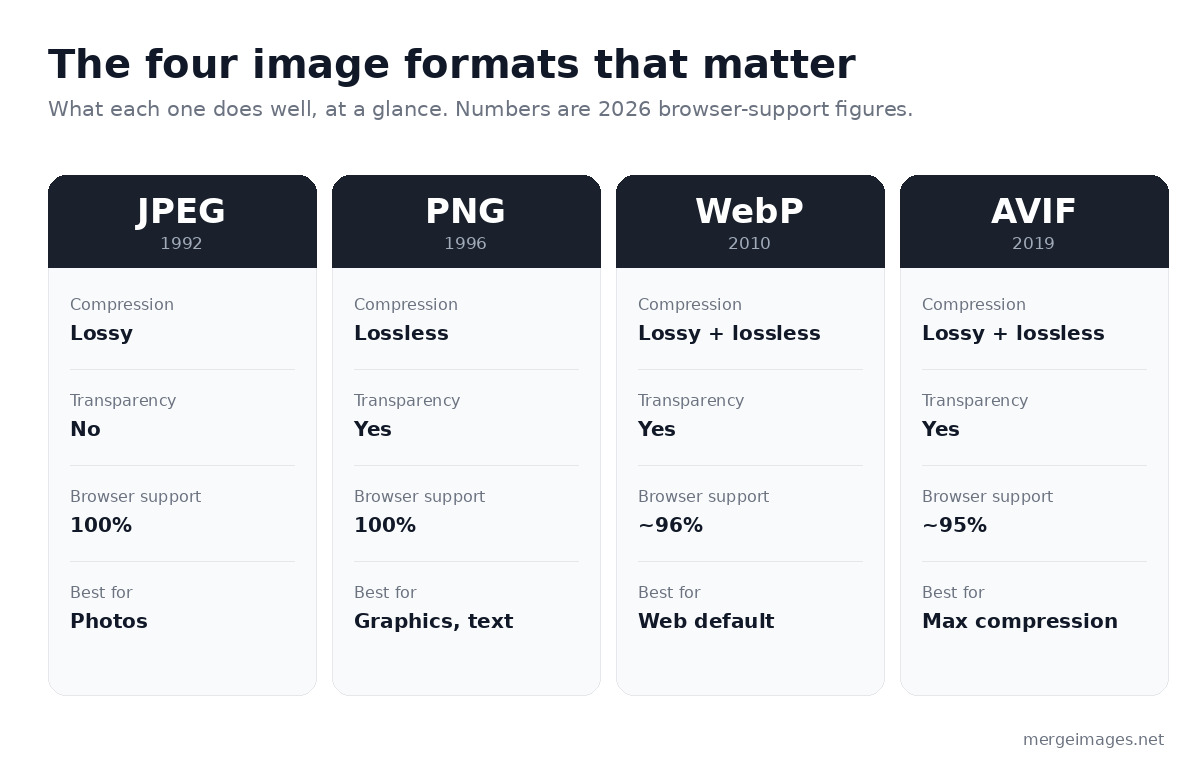
JPEG (1992)
The baseline. Still the most widely supported format on the planet.
- Compression: Lossy, removes visual data to shrink file size
- Transparency: Not supported
- Browser support: 100%
- Best for: Photographs, complex images with gradients
PNG (1996)
The lossless standard.
- Compression: Lossless, no visual data removed
- Transparency: Full alpha channel support
- Browser support: 100%
- Best for: Screenshots, logos, graphics with sharp edges, anything needing transparency
WebP (2010)
Google's format designed to replace both JPEG and PNG.
- Compression: Both lossy and lossless modes
- Transparency: Supported
- Browser support: ~96% (every current browser)
- File size vs JPEG: ~25-35% smaller at equivalent quality
- Best for: Web images where broad support matters more than maximum compression
AVIF (2019)
The current state of the art for compression efficiency.
- Compression: Both lossy and lossless modes
- Transparency: Supported
- Browser support: ~95%
- File size vs WebP: up to ~30% smaller at equivalent quality
- Encoding speed: roughly 10-50x slower than WebP, and far worse at maximum-compression settings
- Best for: Static images where you can afford offline encoding time
Head-to-Head Comparison
| Format | File Size | Quality | Transparency | Browser Support | Encoding Speed |
|---|---|---|---|---|---|
| JPEG | Baseline | Good | No | 100% | Fast |
| PNG | Larger | Lossless | Yes | 100% | Fast |
| WebP | -30% vs JPG | Good | Yes | ~96% | Fast |
| AVIF | -50% vs JPG | Excellent | Yes | ~95% | Slow |
The numbers tell part of the story, but context matters. A 50% smaller file sounds great until you are encoding 10,000 user-uploaded photos in real time and your server cost climbs with every conversion.
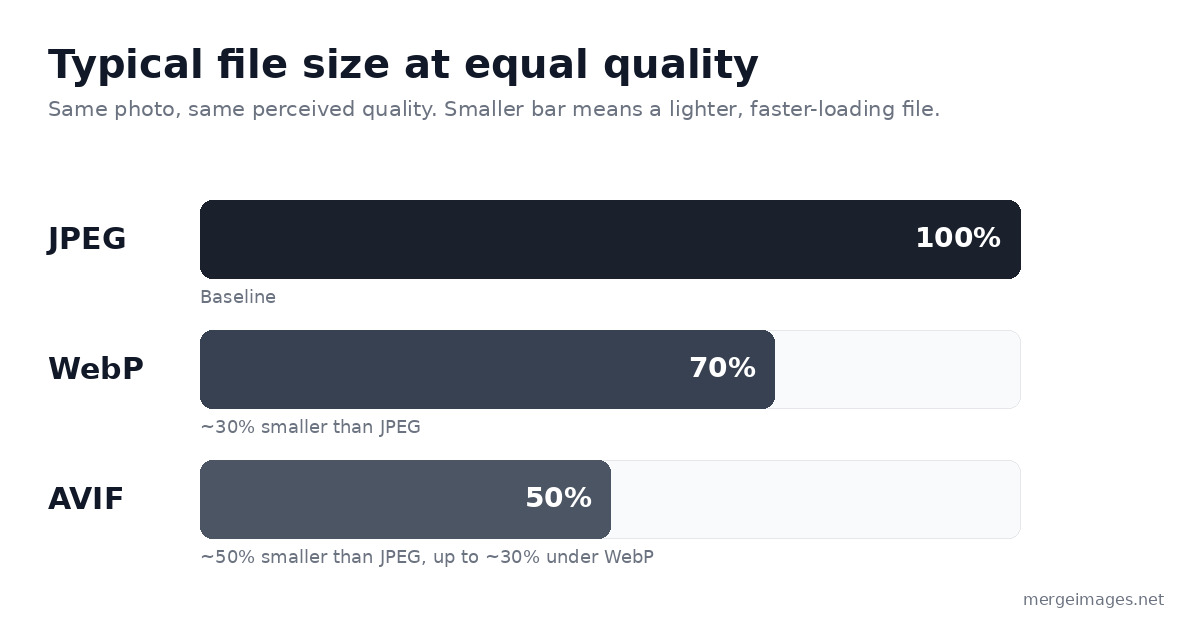
Those savings hold at the same perceived quality, so the lighter bar is a smaller download, not a worse-looking image. The catch is encoding time: a 2 MB photo that turns into WebP in under a second can take ten to forty seconds to encode as AVIF at typical settings.
When to Use Each Format
Use JPEG when:
- You need 100% compatibility (email clients, legacy CMS, print workflows)
- The image is a photograph without transparency
- You need fast compression (batch processing thousands of images)
- You are uploading to platforms that re-compress anyway (Instagram, Facebook, TikTok)
Use PNG when:
- You need transparency (logos, icons, overlays)
- The image has sharp edges or text (screenshots, diagrams)
- Lossless quality is required (medical imaging, archival)
Use WebP when:
- You are building a modern website and control the
<picture>tag - You want a real file size reduction with near-universal support
- You need both transparency and compression, which JPEG cannot offer
Use AVIF when:
- You are optimizing a static website where images are encoded once and served many times
- Maximum compression efficiency is the priority
- You can afford the slower encoding pipeline
- You have a WebP fallback for the small share of browsers that do not support AVIF
The <picture> Tag Pattern
The proper way to serve modern formats with fallbacks:
<picture>
  <source srcset="image.avif" type="image/avif">
  <source srcset="image.webp" type="image/webp">
  <img src="image.jpg" alt="Description" loading="lazy">
</picture>
This pattern serves AVIF to browsers that support it, WebP to those that do not, and JPEG as the final fallback. All three files need to exist on your server.
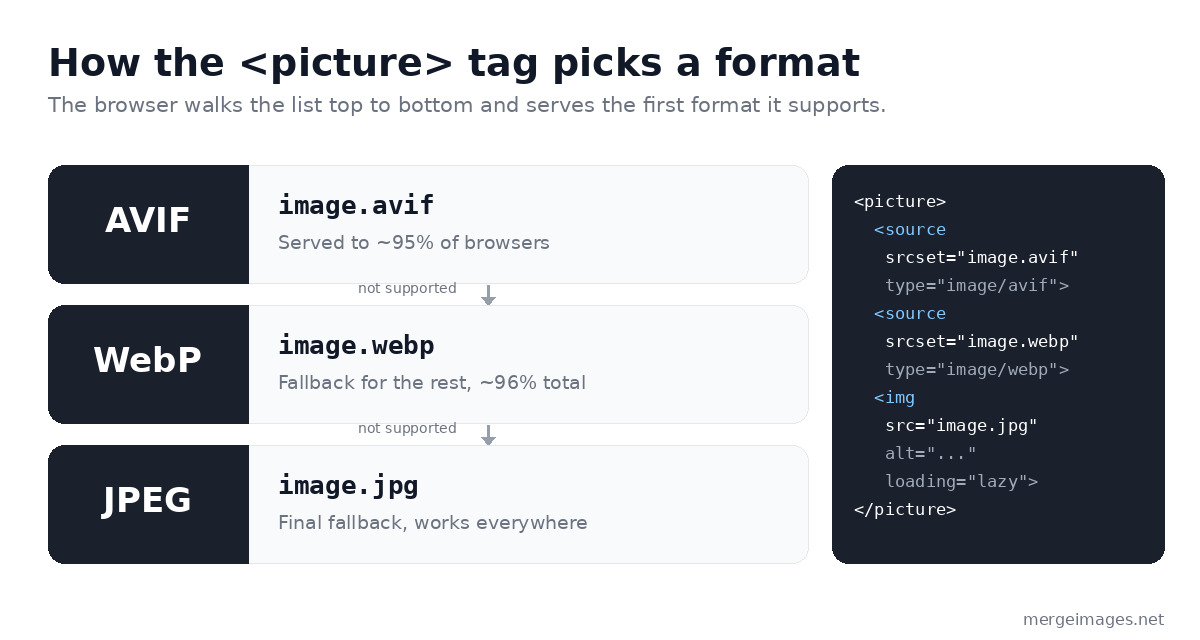
The browser reads the list top to bottom and serves the first format it can decode. AVIF goes first because it is smallest, WebP catches anything that misses, and the plain <img> tag is the guaranteed floor. You only have to write the markup once.
What Format Should You Upload to Social Media?
This is where many guides get it wrong. The format you upload usually does not matter for social media platforms. They re-compress everything on ingestion to their own internal formats.
Instagram converts uploads to JPEG or HEIC internally. TikTok does the same. Facebook compresses everything to WebP for delivery. What matters more than format is resolution: upload at the platform's full recommended resolution so the platform's compression starts from the best possible source.
| Platform | Upload Format | Key Spec |
|---|---|---|
| JPG or PNG | 1080×1080 (square) or 1080×1350 | |
| TikTok | JPG | 1080×1920 |
| JPG or PNG | 1000×1500 | |
| JPG or PNG | 1200×627 | |
| YouTube | JPG or PNG | 1280×720 (thumbnail) |
For platform-specific image prep, the image resizer handles dimension conversion, and the image compressor gets files to platform-safe sizes before upload.
HEIC: The iPhone Format
If you shoot on an iPhone, your photos default to HEIC (High Efficiency Image Container), Apple's implementation of a related standard. HEIC delivers compression close to AVIF but has poor web support outside Apple's ecosystem.
For web use, convert HEIC to JPEG or WebP. Most cloud services (Google Photos, Dropbox) handle this conversion automatically. For direct web uploads or sharing with non-Apple users, convert to JPEG first.
Format Choice for Print
For print, compression quality matters less than it does for web. Print shops work at 300 DPI and at file sizes that would be impractical to serve online. The relevant considerations:
- Use TIFF or uncompressed PNG for master files sent to print labs
- JPEG at maximum quality works for most online print services
- Never use WebP or AVIF for print, because most professional print software does not support them
Check our guide to preparing images for printing for DPI requirements, color profiles, and bleed specifications for different print products.
Practical Workflow Recommendations
For a new website build:
- Encode every image as an AVIF, WebP, and JPEG triple
- Serve them via the
<picture>tag - Use a CDN that handles format negotiation (Cloudflare, Fastly)
For an existing site:
- Migrate your images to WebP first: broad support, real savings, low risk
- Add AVIF for your highest-traffic pages, where the one-time encoding cost is amortized over many requests
For social media content:
- Shoot or create at high resolution in JPG or PNG
- Do not bother converting to WebP or AVIF, because platforms ignore your input format
For email:
- Stick to JPEG and PNG, because WebP and AVIF support in email clients is still poor
Frequently Asked Questions
Is AVIF worth the extra encoding time for a small website?
For a static site with a small image catalog (under 200 images), yes. You encode once and benefit on every page load forever after. For a user-generated content platform with continuous uploads, probably not, at least without a dedicated encoding pipeline.
Will JPEG ever become obsolete?
Not for at least another decade. JPEG has 100% browser support, 100% email client support, universal app support, and a 30-year installed base of tooling. WebP and AVIF are complements to JPEG in practice, not replacements.
Why doesn't everyone just use AVIF?
The encoding bottleneck is real. AVIF's encoder is computationally expensive, often ten to fifty times slower than WebP and worse still at maximum-compression settings. For large catalogs or real-time uploads, that creates server cost and latency problems that can outweigh the bandwidth savings.
Does format affect SEO?
Indirectly. Google's Core Web Vitals include Largest Contentful Paint (LCP), which is affected by image load speed. Smaller files load faster, which improves LCP scores, and modern formats like WebP and AVIF help here. You can also hit strong Core Web Vitals with well-compressed JPEG by using lazy loading and proper sizing.
Conclusion
The practical answer for most people in 2026: upload JPEG for social media, use WebP as your web default, and consider AVIF for your static website images when you want maximum compression. Use PNG for transparency and graphics, always.
To compress your images before upload to any platform, the image compressor cuts file sizes hard. For AI-quality upscaling that produces clean JPEG output, the AI image upscaler handles the conversion pipeline. To resize to platform specs, the image resizer gets you to exact dimensions in seconds.

Bello builds useful software and writes thoughtful content to make sense of it all. He tests the tools himself and checks the facts before any of it goes in a guide.
Try Our Free Image Tools
Ready to Try It?
Put these tips into practice with our free online image merger. No signup required.
Merge Images Now


