
Summarise this article with:
Twitter became X in 2023, but the image dimensions stayed roughly the same, and the platform's visual requirements are more specific than most creators realize. Get the dimensions wrong and you'll have profile photos that look pixelated, headers that crop oddly, and post images that display at the wrong aspect ratio and get cut off in the feed.
This is the complete reference for every Twitter/X image type in 2026, with design tips for each.
Twitter/X Image Dimensions: Complete Reference
| Image Type | Recommended Size | Aspect Ratio | File Limit | Formats |
|---|---|---|---|---|
| Profile Photo | 400 × 400px | 1:1 (square, shown as circle) | 2MB | JPG, PNG, GIF |
| Header Photo | 1500 × 500px | 3:1 | 5MB | JPG, PNG, GIF |
| In-Feed Single Image | 1200 × 675px | 16:9 | 5MB | JPG, PNG, GIF |
| In-Feed Image (portrait) | 1080 × 1350px | 4:5 | 5MB | JPG, PNG |
| In-Feed 2-image grid | 1200 × 675px each | 16:9 | 5MB each | JPG, PNG |
| In-Feed 3-image grid | Mix of landscape and portrait | Variable | 5MB each | JPG, PNG |
| In-Feed 4-image grid | 1200 × 675px each | 16:9 | 5MB each | JPG, PNG |
| Twitter Card (summary large) | 1200 × 628px | 1.91:1 | 5MB | JPG, PNG |
Twitter/X compresses all uploaded images. JPG quality above 85% before upload yields the best post-compression results. PNG is better for screenshots, graphics, and images with text, Twitter's JPG compression can introduce noticeable artifacts on hard geometric shapes.
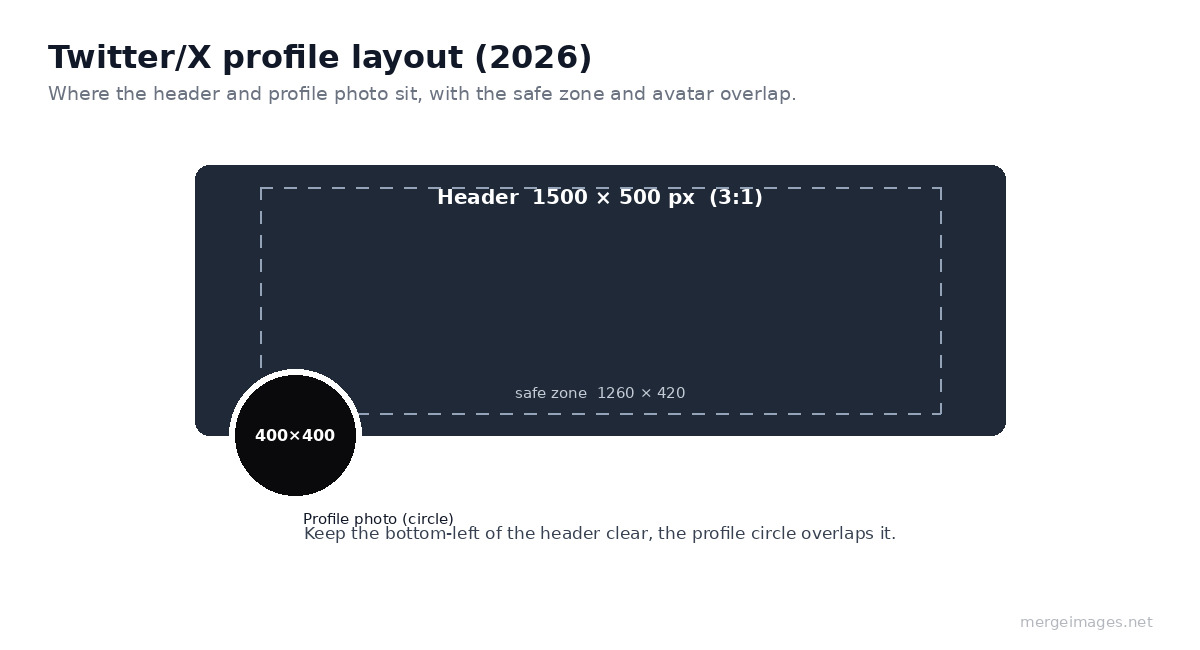
Profile Photo on Twitter/X
The profile photo displays as a circle at 48 × 48px in the feed, 200 × 200px on your profile page, and 400 × 400px at maximum size. Upload at 400 × 400px or larger, Twitter scales down, so higher resolution gives crisper rendering at all display sizes.
Design considerations for Twitter/X profile photos:
For personal accounts: A headshot with your face filling most of the circular crop. Good lighting, neutral or simple background. Avoid wide shots where your face is small in the frame, at 48px in the feed, a distant headshot becomes unrecognizable.
For brand accounts: Your logo, ideally a square-friendly version. Logos that extend to the edges get cut by the circular crop, leave 10-15% padding on all sides. Test the circular crop before publishing.
For media and news accounts: A tight version of your masthead logo, or a branded icon that's recognizable at thumbnail size.
Use the profile picture maker to preview exactly how your image looks at Twitter's circular crop before uploading. The tool shows the cropped circle at different sizes so you can verify readability at feed size.
For brand accounts updating profiles across platforms simultaneously, the background remover helps create clean logo cutouts that work on both the white and dark backgrounds Twitter/X supports.
Header Photo (Banner) Dimensions
The Twitter/X header photo runs across the top of your profile at 1500 × 500px, a 3:1 aspect ratio. On mobile, the display narrows and the sides get cropped. The safest approach is to keep important content within the central 1260 × 420px area.
The profile photo overlaps the bottom-left corner of the header (a circle approximately 200px in diameter on desktop). Account for this overlap in your header design, don't place key text or imagery in the bottom-left corner.
Header photo tips:
- High contrast text. The header sits behind your profile name and bio on mobile, keep the center of the header visually clear or use a semi-transparent overlay behind text if you include it
- Brand consistency. Your header should visually connect to your profile photo. Shared colors, fonts, or imagery style makes the profile feel coherent
- Call-to-action. Some accounts use the header as a banner for promotions, new content, or announcements, it's large, visible, and most visitors see it during a first profile visit
- Regular updates. Like Facebook cover photos, updating the Twitter/X header for campaigns, launches, or seasonal content signals an active account
In-Feed Post Images
Single images posted in tweets perform best at 1200 × 675px (16:9). This aspect ratio displays fully in the feed without cropping on desktop and most mobile sizes. Portrait images at 1080 × 1350px (4:5) are also fully supported and display slightly taller in the feed, which can capture more attention while scrolling.
How Twitter/X crops images in the feed:
- 16:9 (1200 × 675px): Displays fully, no cropping
- 4:5 portrait (1080 × 1350px): Displays fully in single-image tweets
- Square (1080 × 1080px): Displays with slight top/bottom cropping in the default feed view
- Tall portrait (9:16): Gets cropped to 4:5 in the feed, with a "click to expand" behavior
For posts featuring multiple images, Twitter/X automatically arranges them in a grid:
- 2 images: Side-by-side rectangles
- 3 images: One large left, two stacked right
- 4 images: 2×2 grid
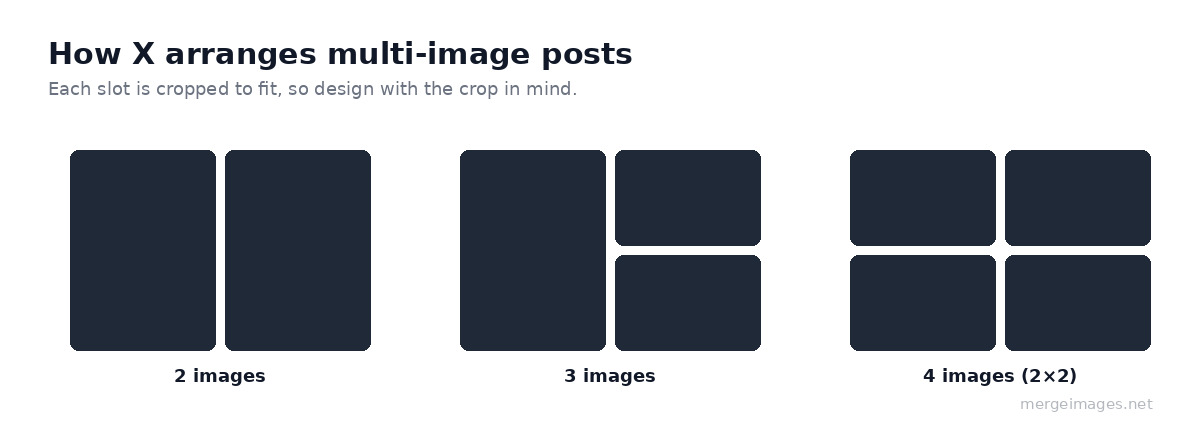
Each image in a multi-image post gets cropped to fit the grid. Design images in the multi-image set with this cropping in mind, or use the horizontal image merge or photo collage maker to arrange your images into a single composition before posting.
Twitter Cards for Link Sharing
When you post a link, Twitter/X can display a "card", a rich preview with an image, title, and description pulled from the linked page's metadata. The image used is determined by the og:image or twitter:image meta tags on the destination page.
Two main card types:
- Summary card with large image: Image at 1200 × 628px, 1.91:1 ratio, this is the standard choice for blog posts, product pages, and landing pages
- App card: For mobile apps, includes app store link and rating
For your own web content, the summary large image card is the most impactful. Set the twitter:card meta tag to summary_large_image and provide a 1200 × 628px image via the twitter:image tag. Cards with compelling images get significantly higher click-through rates than plain link tweets.
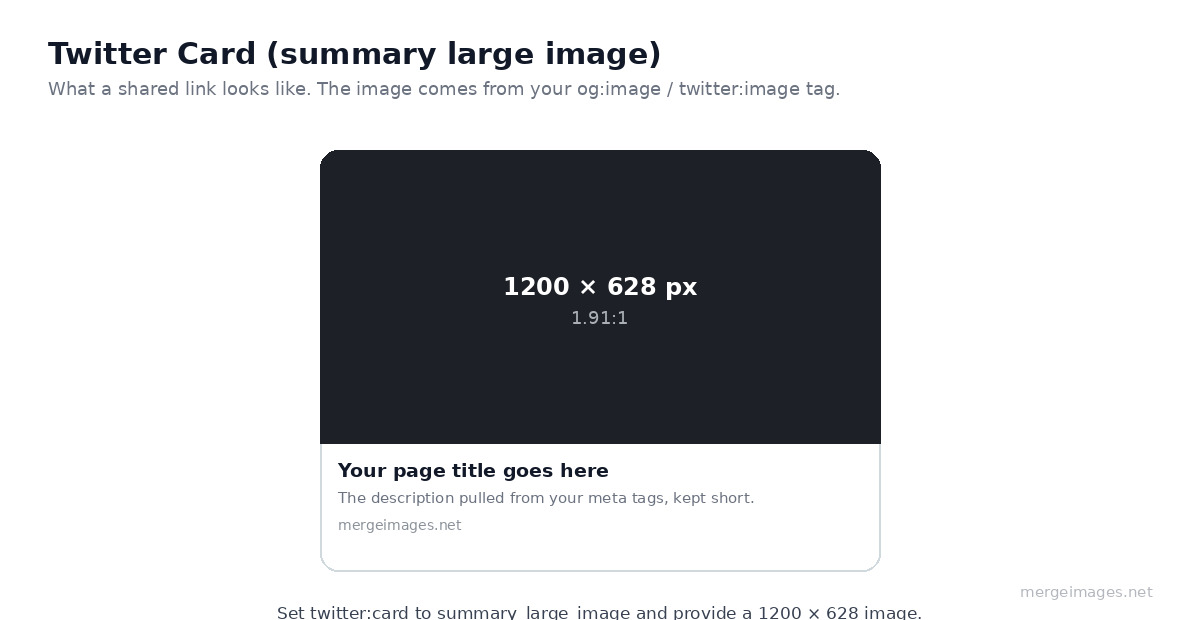
Image Quality and Compression on Twitter/X
Twitter/X compresses uploaded images on its servers. Understanding its compression behavior helps you upload images that survive the process:
JPG files: Twitter applies additional JPG compression after upload. Upload at 85-90% quality to leave room for its compression while maintaining visual quality. Images with fine texture or gradients compress better than images with sharp text or geometric shapes.
PNG files: Twitter converts PNG to JPG for most display uses (with some exceptions). If you're uploading a graphic with text or logos, PNG often survives Twitter's conversion process better than a pre-compressed JPG.
Maximum file sizes: 5MB for photos, 15MB for GIFs (animated), 512MB for videos.
Best practice for text-heavy images: Use PNG, keep the image at 1200 × 675px, and ensure any text is at least 24px at the final image resolution.
Design Tips Specific to Twitter/X
Optimize for mobile. Over 80% of Twitter/X usage is on mobile. Images display at roughly 375px wide on an average phone. Text that looks readable on a 1200px canvas may be tiny on a phone screen, keep fonts large and messaging minimal.
Use the first frame wisely for GIFs. GIFs autoplay in the feed. The first frame is what shows while loading, and the first few frames determine whether someone stops scrolling.
Alt text matters here. Twitter/X supports image alt text and actively promotes accessibility. Add descriptive alt text to every image you post. It also provides text that Twitter's search indexes, adding a minor discoverability benefit.
Images that perform best: According to platform data, tweets with images get roughly 150% more engagement than text-only tweets. Images that perform best include: real product photos (over staged stock photography), bold text overlays with a single clear message, data visualizations, and before/after comparisons.
For businesses on multiple platforms, see how Twitter/X dimensions compare in the broader image sizes for every social media platform guide. If you're also managing a LinkedIn presence, the LinkedIn profile photo and banner guide covers the specific specs for that platform's header and profile images.
Twitter/X vs. Other Platforms: Profile Image Comparison
| Platform | Profile Photo Size | Shape | Upload Minimum |
|---|---|---|---|
| Twitter/X | 400 × 400px | Circle | 200 × 200px |
| 400 × 400px | Circle | 200 × 200px | |
| 320 × 320px | Circle | 110 × 110px | |
| 400 × 400px | Circle | 170 × 170px | |
| YouTube | 800 × 800px | Circle | 98 × 98px display |
| TikTok | 200 × 200px | Circle | 200 × 200px |
The consistency across platforms, all circle profiles, roughly 400 × 400px recommended, means a single high-resolution square photo works across all major platforms with minimal adjustment.
Frequently Asked Questions
What is the Twitter/X profile photo size?
Upload at 400 × 400 pixels minimum, displayed as a circle. Twitter shows it at 48px in the feed and 200px on your profile page. Higher resolution uploads (800 × 800px) render crisper on high-DPI displays.
Why is my Twitter header photo cropped on mobile?
Twitter/X crops the header photo to fit different device widths. On mobile, the sides get trimmed. Keep important content within the central 1260 × 420px area of your 1500 × 500px header to ensure it shows on all devices.
What image size is best for Twitter/X posts?
1200 × 675px (16:9 landscape) displays without cropping in the feed on both desktop and mobile. Portrait images at 1080 × 1350px also display without cropping and take up more vertical feed space.
Does Twitter/X support PNG images?
Yes. PNG is often the better choice for graphics, screenshots, and images with text or logos. Twitter converts PNG to JPG internally for most display purposes, but the initial PNG upload produces cleaner results for sharp-edged content than uploading a pre-compressed JPG.
How do I resize images to fit Twitter/X dimensions?
Use the image resizer to crop or resize to exact pixel dimensions. For profile photos, the profile picture maker previews the circular crop at Twitter's display sizes.
Conclusion
Twitter/X image sizing is more specific than it appears. Profile photos at 400 × 400px become 48px circles in the feed, recognizability at that size requires a very different design decision than profile photos on platforms where they display larger. Headers at 1500 × 500px crop differently on desktop, mobile, and the profile page, and in-feed images at 1200 × 675px survive the platform's compression better than other sizes.
Use the image resizer to hit exact dimensions, the profile picture maker to preview the circular crop, and the background remover to create clean subject cutouts for profile images and branded header designs. See also the complete social media image sizes guide for a unified reference across all platforms.

Bello builds useful software and writes thoughtful content to make sense of it all. He tests the tools himself and checks the facts before any of it goes in a guide.


