無料・登録不要
AI Upscaler for Screenshots
Enlarge small or compressed screenshots so text and UI stay readable in slides, docs, and tutorials. Upscale 2x or 4x for crisp presentations and Retina displays — free, no watermark.
アップスケーラーを開く違いを確認
スライダーをドラッグして、低解像度の元画像とアップスケール後の結果を比較します。
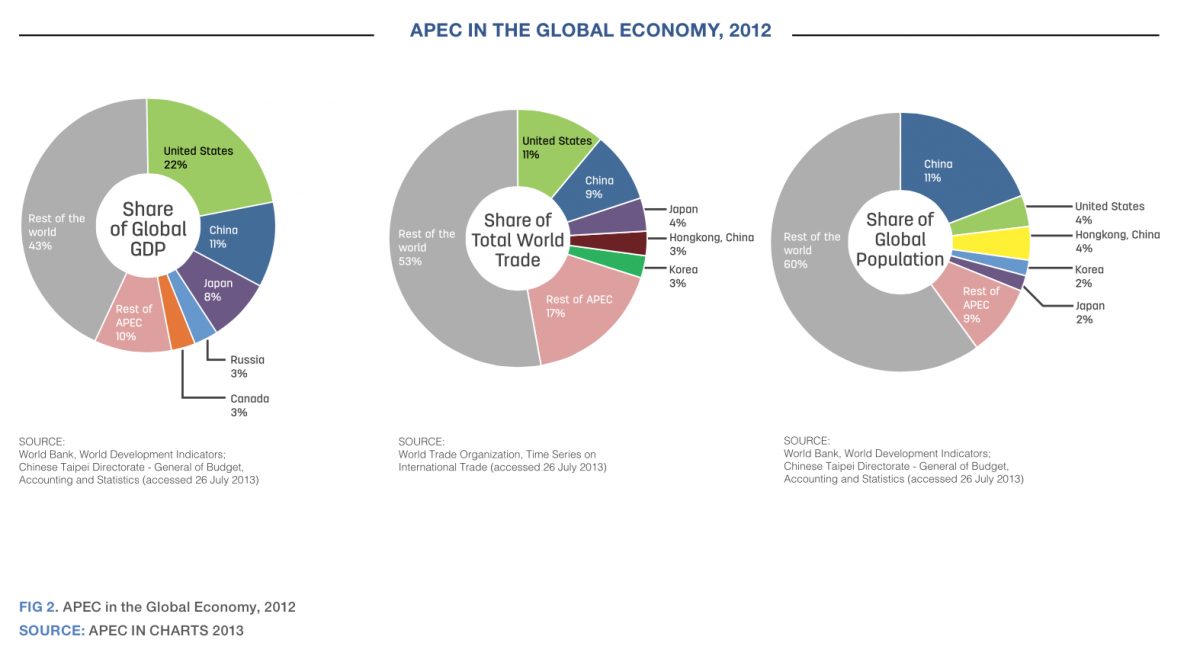
これは説明用の例です。実際の結果はご自身の画像でアップスケーラーをお試しください。
screenshotsをアップスケールする理由
Keep UI text legible when a screenshot is blown up on a projector or 4K display
Fix small or compressed captures pulled from chat apps and PDFs
Make tutorial and documentation images sharp at full-page width
Upscale app-store and demo screenshots to the required resolutions
最良の結果を得るためのヒント
Capture at the highest resolution your screen allows before upscaling
Use 2x for slide decks and 4x for large print or Retina exports
Upscale before adding annotations so callout text stays crisp
For UI with fine text, pair the upscaler with a light sharpen pass
screenshotsをアップスケールする準備はできましたか?
Upload your photo, choose 2x or 4x, and download the full-resolution result. Free, private, no signup.
画像アップスケーラーを開くFrequently Asked Questions
Why do my screenshots look blurry in presentations?
Can the upscaler sharpen tiny UI text?
Is upscaling screenshots free?
関連ガイド
How to Combine Screenshots for Documentation and Tutorials
Merge screenshots into one clear image for docs, tickets and tutorials: fixed capture widths, safe redaction, and file sizes a wiki can carry.
Read articleMobile App Screenshots: Creating App Store Ready Images
Combine mobile app screenshots into compelling presentations for App Store and Google Play listings.
Read articleUpscale Screenshots for Presentations: 4-Step Workflow
An 800px screenshot stretches 2.4x on a 1920px slide and goes blurry. Learn the 4-step workflow to capture, crop, AI-upscale, and insert screenshots projector-ready.
Read articleその他の用途
フル編集に取り組んでいますか?アップスケーラーを背景除去ツール、シャープ化ツール、画像圧縮ツール、画像リサイズツールと組み合わせましょう。
今すぐScreenshotsをアップスケール
無料・プライベートで、ブラウザ上で完結。登録は不要です。
Open Image Upscaler