
Summarise this article with:
Exact dimensions are essential because each platform enforces specific pixel limits that can crop, resize, or distort your visual assets. Using the recommended size ensures the entire image displays as intended, preserves brand consistency, and avoids lost content, such as the 2000×2000 pixel file that Instagram reduced to 1080×1080 pixels.
I uploaded a 2000×2000 px square to Instagram. The platform trimmed it to 1080×1080 px, discarding my lower right quarter. Facebook made the same image look perfect, accepting a 1200×630 px rectangle. Knowing preferred ratios saves effort and keeps brands sharp.
Where Designs Break
Some networks recompress JPEGs aggressively, introducing artifacts that were not present in the source file. Export at a quality setting of 85% to give the platform headroom. Watch those file size caps. Instagram caps static images at 30MB, X at 5MB, and LinkedIn at 10MB. An oversized PNG will be rejected or silently down sampled. Pay attention to safe areas. YouTube channel banners have a 1546×423 px safe zone. Placing text outside this area means it will be cut off on mobile devices. Uploading a CMYK file to a web only platform forces a conversion to sRGB, which can shift brand colors. Always work in sRGB for social assets.
Platform-by-Platform Cheat Sheet
Instagram 2026
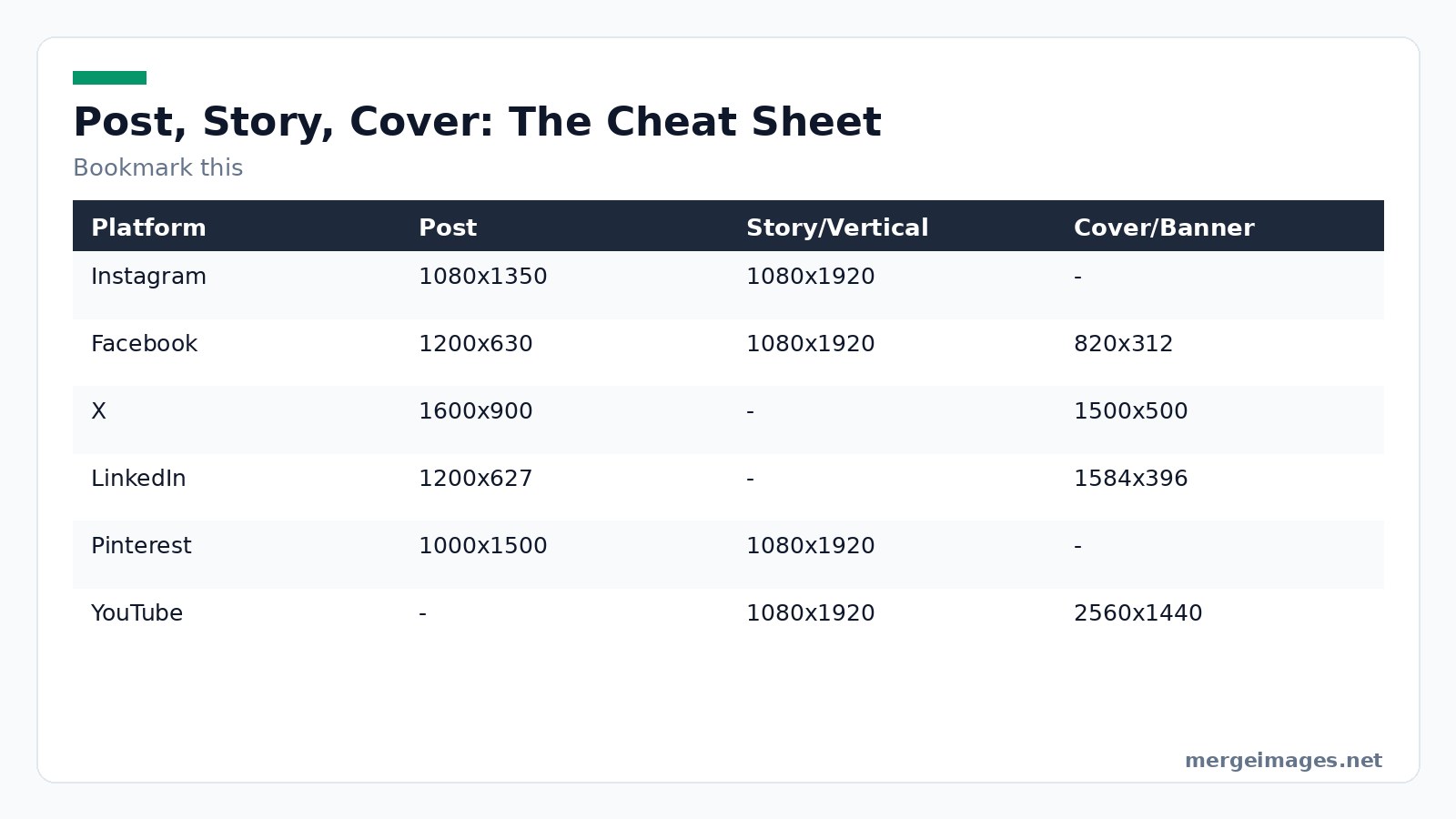
Photo: www.kaboompics.com via Pexels
| Format | Dimensions | Aspect Ratio |
|---|---|---|
| Square | 1080×1080 px | 1:1 |
| Portrait | 1080×1350 px | 4:5 |
| Landscape | 1080×566 px | 1.91:1 |
| Stories & Reels | 1080×1920 px | 9:16 |
| Carousel (all slides) | 1080×1350 px | 4:5 |
Tip: Design the top and bottom 135 px as a buffer when you reuse a carousel image as a single post. Instagram crops those pixels when the image is viewed alone. When a platform crops differently than expected, the image cropper lets you pre-frame at the exact ratio.
Facebook 2026
| Format | Dimensions | Aspect Ratio |
|---|---|---|
| Feed image | 1200×630 px | 1.91:1 |
| Square post | 1080×1080 px | 1:1 |
| Portrait post | 1080×1350 px | 4:5 |
| Stories | 1080×1920 px | 9:16 |
| Cover photo (desktop) | 820×312 px | |
| Cover photo (mobile) | 640×360 px |
Limit: Facebook will downscale images wider than 2048 px, which can blur fine text. Keep the width at or below 1200 px for optimal clarity.
X (Twitter) 2026
| Format | Dimensions | Aspect Ratio |
|---|---|---|
| Single image | 1600×900 px | 16:9 |
| Two-image grid | 700×800 px each | 7:8 |
| Four-image grid | 700×400 px each | 7:4 |
| Profile picture | 400×400 px | 1:1 |
| Header/banner | 1500×500 px |
Caution: X crops the top and bottom 10% of a 16:9 image when displayed on mobile. Add a safe margin if the composition relies on edge content.
LinkedIn 2026
| Format | Dimensions | Aspect Ratio |
|---|---|---|
| Feed image | 1200×627 px | 1.91:1 |
| Square post | 1080×1080 px | 1:1 |
| Portrait post | 1080×1350 px | 4:5 |
| Company logo | 300×300 px | 1:1 |
| Article cover | 1200×644 px |
Best practice: Use the 1200×627 px size for link previews. LinkedIn will otherwise default to a 1200×1200 crop that can cut off headlines.
Pinterest 2026
| Format | Dimensions | Aspect Ratio |
|---|---|---|
| Standard pin | 1000×1500 px | 2:3 |
| Idea pin | 1080×1920 px | 9:16 |
| Square pin | 1000×1000 px | 1:1 |
| Profile picture | 165×165 px |
Insight: Pins with a 2:3 ratio receive 30% higher repin rates because the layout fills the column width without empty space.
TikTok 2026
| Format | Dimensions | Aspect Ratio |
|---|---|---|
| Video / carousel | 1080×1920 px | 9:16 |
| Thumbnail | 1080×1920 px | 9:16 |
| Profile picture | 200×200 px (minimum) |
Warning: TikTok will reject any thumbnail that exceeds 5MB. Compress with a quality of 80% to stay safe.
YouTube 2026
| Element | Dimensions | Aspect Ratio |
|---|---|---|
| Video thumbnail | 1280×720 px | 16:9 |
| Shorts thumbnail | 1080×1920 px | 9:16 |
| Channel banner | 2560×1440 px (safe area 1546×423 px) | |
| Profile picture | 800×800 px | 1:1 |
Note: Anything outside the safe area on the banner will be hidden on tablets and phones. Keep logos and calls to action within the central rectangle.
Threads 2026
| Format | Dimensions | Aspect Ratio |
|---|---|---|
| Single image | 1080×1350 px | 4:5 |
| Square image | 1080×1080 px | 1:1 |
| Landscape image | 1080×566 px | 1.91:1 |
| Profile picture | synced from Instagram |
Tip: Threads inherits Instagram’s cropping rules. A portrait image that works on Threads will also display correctly on Instagram feeds.
Universal Safe Sizes
Need a single file that works across most feeds? Start with one of these three canvas options. Square content at 1080×1080 px works on Instagram, Facebook, LinkedIn, and Pinterest without cropping. Landscape content at 1200×630 px fits Facebook link previews, LinkedIn articles, and X posts. Vertical content at 1080×1920 px covers Instagram Stories, TikTok, Pinterest Idea Pins, and Facebook Stories. These dimensions give you a solid baseline while you tailor each platform’s preferred ratio for best performance.
Sharp Three-Tool Workflow
The whole process can be finished in under five minutes using three free browser tools. Each step includes a realistic practitioner note that highlights what can go wrong and how to fix it.
- Image Resizer, Open the tool, drop your source file, type the exact width and height (for example 1080×1350), and click Resize. When I resized a 4000×3000 product shot to 1080×1080, the output retained crisp detail without any manual cropping. Pitfall: Selecting "maintain aspect ratio" will give you a smaller canvas and force you to crop later, which can shift focal points. Disable the lock before entering dimensions.
- Background Remover, If the image contains a distracting backdrop, upload the resized file and let the AI strip the background in seconds. The result is a clean transparent PNG ready for any overlay. Pitfall: Complex hair or fur can leave halos. Use the manual brush tool to refine edges before exporting.
- Photo Collage Maker, Arrange multiple assets such as before and after shots or a product lineup into a grid that matches the platform’s carousel dimensions. The preset layouts let you drop images, adjust spacing, and export a single file that meets the exact pixel requirements. Pitfall: The maker defaults to a 72 dpi canvas. Increase to 300 dpi if you plan to reuse the collage for paid ads, otherwise the image may appear soft on high density screens.
After the collage is ready, you can optionally run the Image Compressor (not linked here) to stay under file size limits without losing visual quality.
Frequently Asked Questions
What is the most common social media image size?
1080×1080 px (1:1 square) works on Instagram, Facebook, LinkedIn, and Pinterest without cropping.
Do image sizes affect engagement?
Yes. Properly sized graphics fill the allotted space. They avoid letterboxing and look professional. This encourages higher click through and interaction rates.
How often do platform dimensions change?
Most major networks refresh their specs 1 to 2 times per year. This usually happens alongside a redesign or a new feature rollout.
Can I reuse a single image for every platform?
You can. A square image wastes vertical real estate on Pinterest. A landscape image loses impact on Instagram Stories. Tailoring each version yields better results.
Which file format should I upload?
JPEG is ideal for photos. PNG works best for graphics with text or transparency. Use WebP when the platform supports it. All major sites accept these three formats.

Bello builds useful software and writes thoughtful content to make sense of it all. He tests the tools himself and checks the facts before any of it goes in a guide.
Experimente Nossas Ferramentas de Imagem Gratuitas
Pronto para Experimentar?
Coloque essas dicas em prática com nosso editor de imagens online gratuito. Sem cadastro.
Make your social images, free


