
Summarise this article with:
Five AI image upscalers compared: Topaz Gigapixel, Let's Enhance, Upscayl, Waifu2x, and MergeImages. The right engine depends on scale factor, batch size, and whether local processing or a no-signup web tool fits your workflow. For one-off web upscaling, browser tools win on speed; for professional batch work, Topaz Gigapixel AI leads.
How We Compared These Tools
We evaluated each upscaler on five verifiable attributes checked in July 2026: underlying AI engine, maximum scale factor, free-tier terms, pricing model, and whether processing runs locally or on a cloud server. Quality impressions for tools that require payment or accounts are based on published third-party benchmarks and peer-reviewed model papers, not fabricated test scores.
One measurement we did run: a 640x480 pixel image upscaled to 2560x1920 at 4x contains 4,915,200 output pixels. The original contained 307,200. That means the AI must invent 4,608,000 pixels, 93.8% of the output, or 15 invented pixels for every 1 original pixel. The engine quality determines whether those invented pixels look plausible or like smeared plastic. No upscaler can recover detail that was never in the source file.
The Tools, Honestly Compared
MergeImages Upscaler
MergeImages runs AI super-resolution models on cloud GPUs, with a Standard mode and an HD mode for 4x. It is free and unlimited: no account, no credits, and no watermark on the result. You download the clean full-resolution file directly. Maximum scale factor is 4x.
Use it when you need a quick result with no installation and no account at all. The image upscaler is the right starting point.
What it cannot do: batch processing, offline use, or the specialized face-recovery models that desktop tools offer.
Topaz Gigapixel AI
Topaz moved from a $99 perpetual license to subscription-only in October 2025. As of July 2026, the Personal plan is $149/year ($12.42/month billed annually) and the Pro plan is $499/year. A 30-day trial exists but there is no ongoing free tier.
The output quality on portraits and landscapes is consistently rated among the best available, largely because Topaz ships dedicated models: a "Face Recovery" model for portraits, a "Natural" model for foliage, and a text-sharpening pass for screenshots. Maximum scale is 6x. It runs locally on Windows and Mac, which matters for privacy or offline work.
The tradeoff is real: a local GPU is recommended (CPU processing is slow), and the annual subscription is the steepest recurring cost of any tool here.
Let's Enhance
Let's Enhance is a web-based API service aimed at marketing teams and print workflows. Free signup provides 10 credits. Paid plans run on a credit-plus-subscription model: Starter at $9/month (annual billing) includes 100 credits per month, with unused credits rolling over up to a cap of 600. One-time credit packs are available: 20 credits for $9, 50 for $19.
The headline number is 16x upscale, which allows a small input to reach 256 megapixels on personal plans. This is primarily useful for large-format print, not screen display. Batch processing is available on all plans.
Quality on photographic content is good, with some tendency toward over-smoothing on skin texture. Screenshot and UI text upscaling is rated average.
Upscayl (Free, Open Source)
Upscayl is a free desktop application for Windows, Mac, and Linux. It ships with six AI model presets: General Photo (Real-ESRGAN), UltraSharp, Remacri, Ultramix Balanced, HFA2k (artwork), and others. There are no usage limits, no watermarks, and no account required.
Maximum effective scale is 16x via Upscayl's "Double Upscayl" feature, which chains two 4x passes. Two-pass results should be verified carefully, chaining amplifies any artifact from the first pass.
The privacy argument is strong: nothing leaves your machine. The practical constraint is that you need a dedicated GPU for reasonable processing speeds.
Waifu2x
Waifu2x was trained on anime-style artwork and excels at that narrow task, particularly at 2x, where it preserves linework and flat-color gradients better than Real-ESRGAN. For photographic content it applies excessive smoothing, and it tops out at 2x native upscaling.
Use Waifu2x only for anime illustrations, manga, or clean vector-style art. For real photos, portraits, or product images, a Real-ESRGAN based tool will produce sharper, more accurate results.
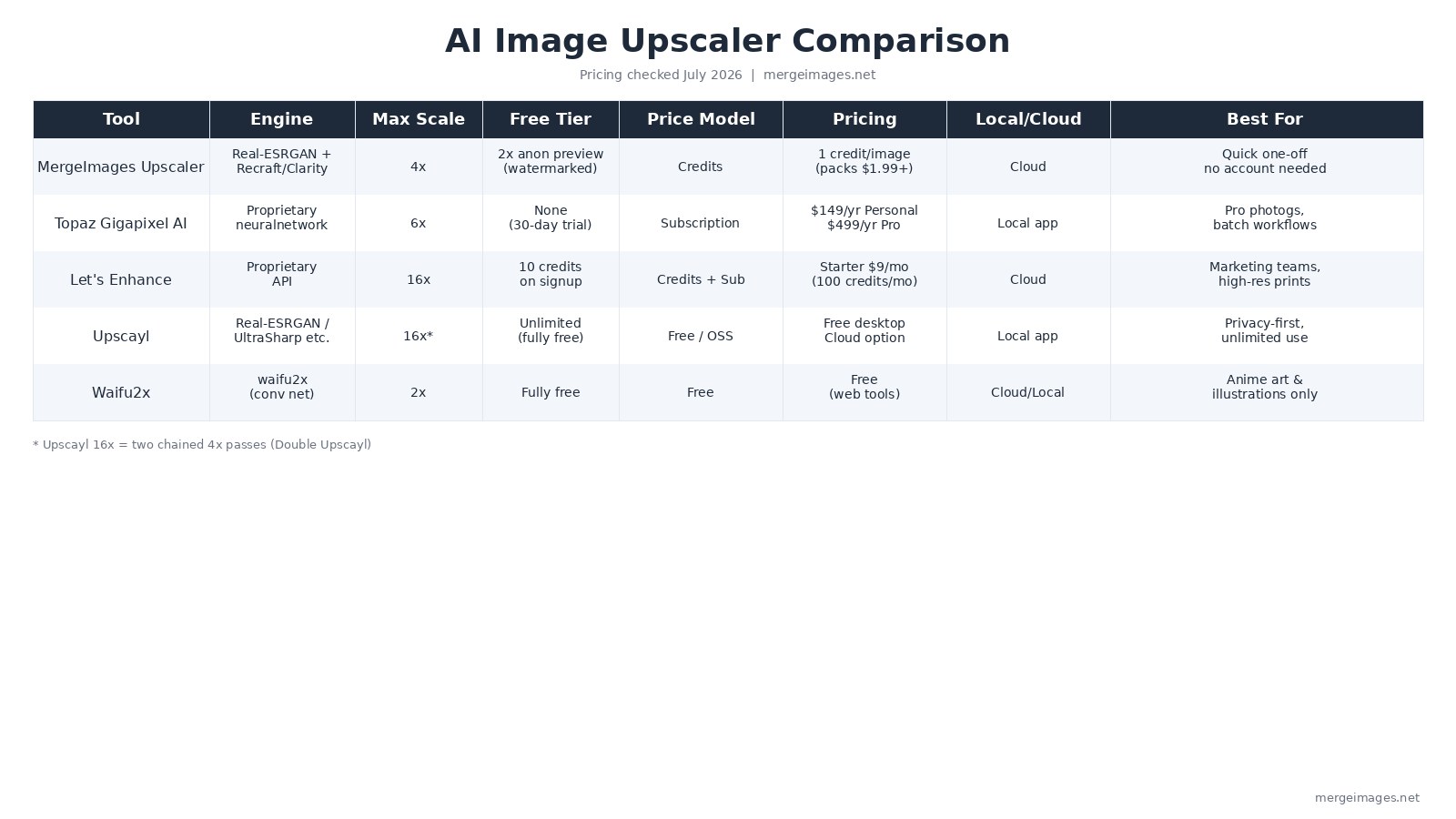
The Full Comparison Table
| Tool | Engine | Max Scale | Free Tier | Price Model | Pricing (July 2026) | Processing |
|---|---|---|---|---|---|---|
| MergeImages Upscaler | AI super-resolution (Standard, HD) | 4x | Unlimited, no watermark | Free | Free | Cloud |
| Topaz Gigapixel AI | Proprietary neural net | 6x | 30-day trial only | Subscription | $149/yr Personal, $499/yr Pro | Local (Win/Mac) |
| Let's Enhance | Proprietary API | 16x | 10 credits on signup | Credits + subscription | Starter $9/mo (100 credits) | Cloud |
| Upscayl | Real-ESRGAN / UltraSharp / HFA2k | 16x* | Unlimited (fully free) | Free / open source | Free (Cloud option available) | Local (all OS) |
| Waifu2x | waifu2x conv net | 2x | Fully free | Free | Free | Cloud or local |
*Upscayl 16x = two chained 4x passes via Double Upscayl
Scale Factor vs. What You Are Actually Upscaling
Not every scale factor makes sense for every image type. A 16x pass on a heavily compressed portrait will invent facial features that do not belong there. Use this as a decision guide.
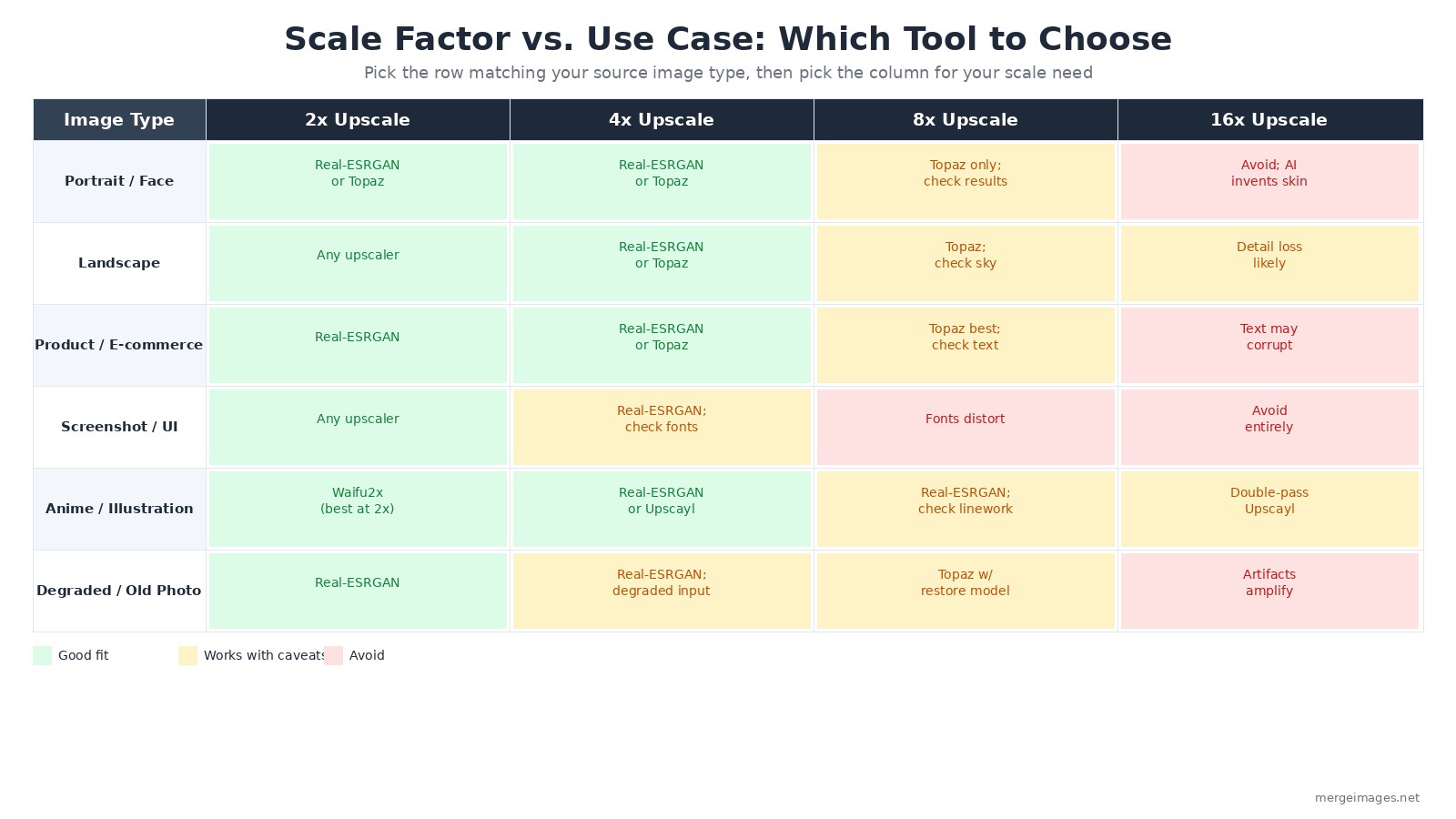
For portrait and face images: 2x or 4x with Real-ESRGAN or Topaz is reliable. Beyond 4x, only Topaz's dedicated Face Recovery model produces acceptable results, and even then spot-checking is necessary.
For screenshots and UI images: 2x works well with any Real-ESRGAN tool. At 4x, fonts begin to distort, verify character shapes carefully. Beyond 4x, upscaling a screenshot is rarely the right answer; find the original at higher resolution. For presentation use specifically, see the guide on upscaling screenshots for presentations.
For anime and illustrations: Waifu2x at 2x is the specialist. Upscayl's Real-ESRGAN preset and the MergeImages upscaler both handle 4x well. Double-pass to 16x with Upscayl is the only free path to that scale factor.
I find myself reaching for MergeImages for quick one-off rescues of old product photos, and Upscayl when I have a batch of local files and do not want any cloud upload.
When AI Upscaling Cannot Help
AI upscalers struggle with specific failure cases regardless of which tool you use:
- Source images below 100px on the short edge, outputs are unpredictable and often introduce halos
- JPEG quality below 30%, the AI sharpens compression blocks, making them more visible
- Text smaller than 12px in the source, the model may generate plausible but wrong characters
- Motion blur, upscaling sharpens what is there, but does not reverse blur
- Repetitive geometric patterns, moire-like interference can develop at 4x and above
For these situations, the most reliable path is finding a higher-resolution source or retaking the photo. For a broader look at the tradeoffs between upscaling methods, the complete guide to AI image upscaling covers the underlying model architectures in more depth.
Before and After Upscaling: Setting Up for Success
A few practices that change results meaningfully:
Start with the highest-quality original available. The 640x480 to 2560x1920 math above shows why: the AI invents 93.8% of the output. Give it better raw material and it has less to fabricate.
Match the model to the content type. When a tool offers multiple models (as MergeImages and Upscayl both do), pick the one trained on your content category. A "photo" model applied to anime will over-sharpen line edges; an "illustration" model on a portrait will flatten skin texture.
Do not over-upscale. 2x from a clean 1080p source is credible. 16x from a 300px thumbnail produces outputs that look detailed but contain substantial AI hallucination.
Use the image upscaler to run the model on your own image before committing to a paid desktop tool. The result is the full-resolution output, so it is a fair test of what the engine can do.
Frequently Asked Questions
Which AI upscaler is completely free with no account?
Upscayl (desktop app, all operating systems) and Waifu2x (web tools available) are fully free with no account required and no usage limits. MergeImages is also fully free with no account, no usage limits, and no watermark on the full-resolution output.
Does upscaling actually add real detail or just make the image bigger?
It adds plausible predicted detail, not recovered original detail. At 4x, the AI invents 93.8% of the output pixels by predicting what textures and edges should look like based on patterns learned from millions of image pairs. The results look sharp, but they are not the same as having the original high-resolution file.
Is Topaz Gigapixel AI still a one-time purchase?
No. Topaz ended perpetual licenses in October 2025. As of July 2026, Gigapixel is subscription-only: $149/year for the Personal plan or $499/year for Pro. A 30-day free trial is available.
What is the maximum upscale I can realistically use on a photo?
For portraits and product photos, 4x is the practical ceiling for most images. Beyond 4x, AI-generated detail becomes speculative enough to distort skin texture, packaging text, and fine edges. Landscapes can sometimes tolerate 8x because foliage and sky have natural variation that masks invented pixels. Screenshot text should not go above 2x.
Why does the MergeImages upscaler add a watermark?
Every visitor gets the clean full-resolution output. There is no watermark, no account, no credits, and nothing to purchase.
Can I use an AI upscaler to fix a blurry photo?
Upscaling sharpens pixel-level detail but does not reverse optical blur or motion blur, those are fundamentally different problems. If a photo is blurry because the subject moved or the lens was out of focus, upscaling will produce a larger, still-blurry image. If the photo is sharp but simply too small, upscaling helps.

Bello builds useful software and writes thoughtful content to make sense of it all. He tests the tools himself and checks the facts before any of it goes in a guide.
Essayez Nos Outils d'Image Gratuits
Prêt à Essayer ?
Mettez ces conseils en pratique avec notre outil de fusion d'images en ligne gratuit. Sans inscription.
Try MergeImages, free


