
Summarise this article with:
A letter-size yearbook page printed at 300 PPI needs 2550 by 3300 pixels, so a 3 by 4 grid leaves each photo about 850 by 825 pixels to work with. Gather more photos than you need, crop every face to the same eye line, and settle permission for anyone else's child before the page gets shared.
Yearbooks capture the official version of a school year. A personal collage lets you keep the version you actually remember, which is usually funnier and has more people in it. The work is less about design taste than about three unglamorous things: resolution, consistent cropping, and knowing whose photos you are allowed to use.
Types of Yearbook Collages
The academic-year overview runs first day to last day and works because the growth is visible across the page. The subject-based page groups one thread, sports or drama or a club, and reads better when every photo was taken in a similar setting. The friend-focused page is the one people keep, and the one most likely to contain other families' children.
Pick one before you start collecting. A page that tries to be all three ends up as a wall of faces with no order to it.
Gathering Photos
Pull from your own camera roll first, then friends, then official school photos and event photographers, then social media as a last resort. That order matters: every time an image passes through a messaging app it gets recompressed and usually resized, and you cannot get that detail back.
So ask for originals rather than group-chat copies, and collect roughly twice the number of photos you plan to use. Culling to a strong twelve out of twenty-four gives a far better page than stretching nine decent ones.
Permission and Photos of Other People's Children
This is the part a generic collage guide skips, and it is the one that can actually cause trouble.
Try it hereOpen the collage makerBuild a photo collageArrange your images into one clean layout, free.
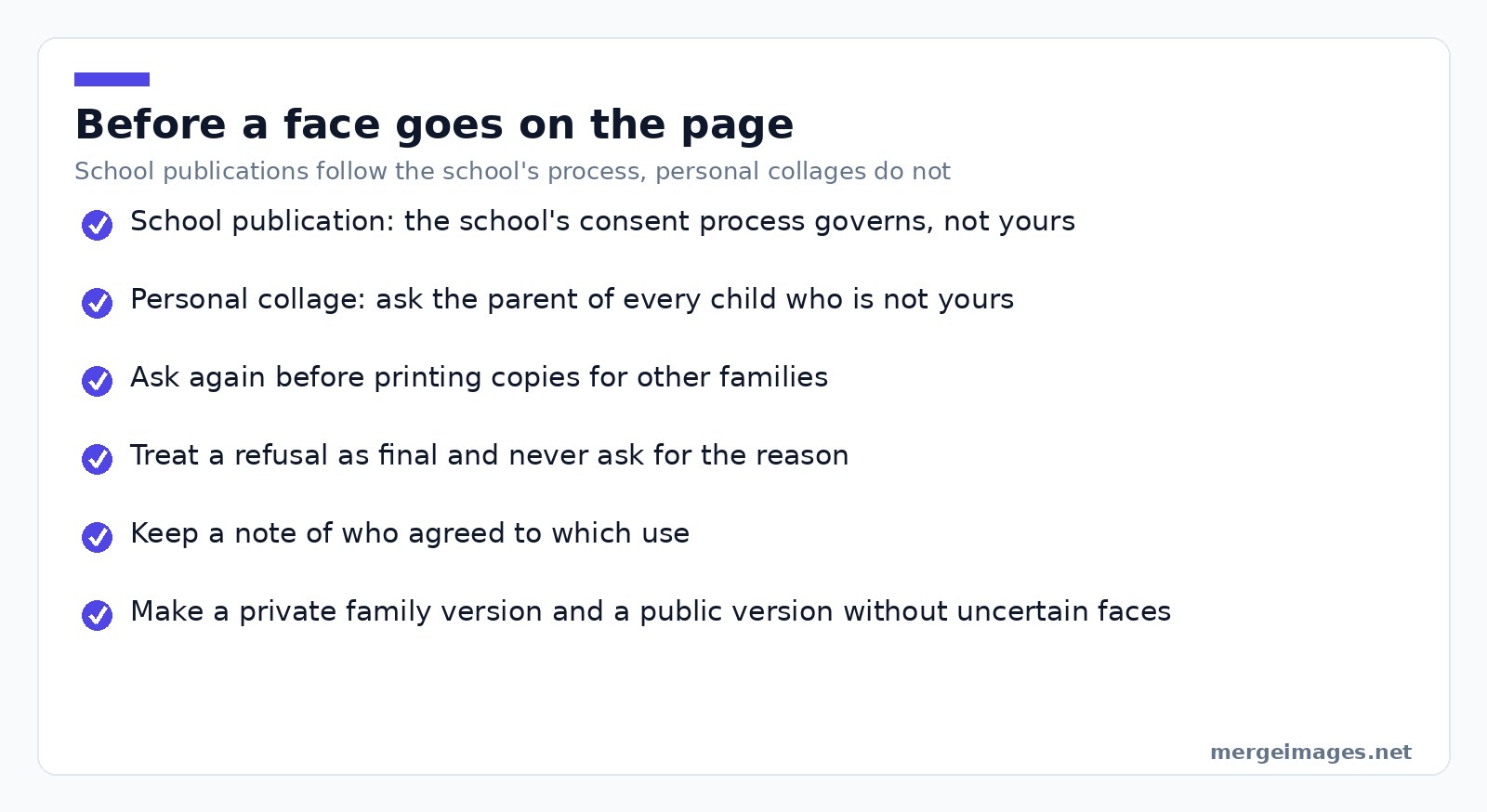
If the page is going into an official school publication, the school's own consent process governs it, not yours. In the US that sits under FERPA, and the Department of Education's guidance defines when a photo of a student counts as an education record: when it is both directly related to a student and maintained by the school or someone acting for it. That page also notes that schools often designate photos of students at public events as directory information, or obtain consent from parents, before disclosing them. It draws a useful line for collage work too. In its basketball example, a close-up of two or three players is directly related to those players, but not to the spectators visible in the background.
Your own collage is a different situation. FERPA is about schools and their records, not about a personal keepsake, so the rule that applies is simpler and older: ask the parents. Ask before you post it publicly, ask before you print copies for other families, and accept a no without negotiating. Some families have court orders, safeguarding arrangements or plain preferences you will never be told about, and none of them are your business.
Two habits make this painless: note who agreed to what, and when in doubt make a private version for the family plus a public one with the uncertain faces left out.
Creating Year-End Collages
Layout follows arithmetic more than taste. Four photos want a 2 by 2, six want 3 by 2, nine want 3 by 3, and twelve want 3 by 4 on a portrait page. Awkward counts like seven, ten or eleven are the ones that look wrong, so either cull to the nearest clean grid or promote one image to a feature slot and grid the rest around it.
Photo: Samer Daboul via Pexels
Then the thing that separates a good page from a scrapbook: crop every portrait to identical dimensions with the image cropper, and place the eyes at about a third of the way down each frame. When the eye line is consistent, a grid of twelve unrelated photos reads as one designed page. When it is not, every face sits at a different height and the whole thing looks like a noticeboard.
Drop the cropped set into the photo collage maker, keep the gutter identical everywhere, and pick a background that is not pure white if the page will be printed, since white gutters plus white paper make the photos float.
I laid out a twelve-photo page for a cousin's leavers' book last year. Nine images came straight off a phone and printed cleanly. The other three had been downloaded back out of a group chat at 720 pixels wide, and those three were the only ones that looked mushy on paper. Cropping the set to 850 by 825 pixels with a common eye line took about twenty minutes and improved the page more than any border I tried.
Grade-Specific Ideas
Elementary pages work best with artwork and field trips, where the photos are colourful and the faces are incidental. Middle school is mostly activities and friendship groups, high school splits neatly into sports seasons, dances and last-year milestones, and college pages need fewer and larger photos because the audience already knows everyone.
Graduation Collages
Cap and gown, the family shot, the friends shot, a school landmark, and one photo of the actual work. Five images at a decent size beat fifteen small ones for a framed print, because this one gets looked at from across a room rather than at reading distance.
Printing and Sharing
Work out the pixels before you design, not after. A standard letter page at 300 PPI is 2550 by 3300 pixels, and an A4 page is 2480 by 3508. Divide by your grid to get the size each source photo needs: a 3 by 4 grid on letter gives cells of roughly 850 by 825 pixels, and a 3 by 3 grid gives cells of about 850 by 1100, so anything smaller than that will be visibly soft.
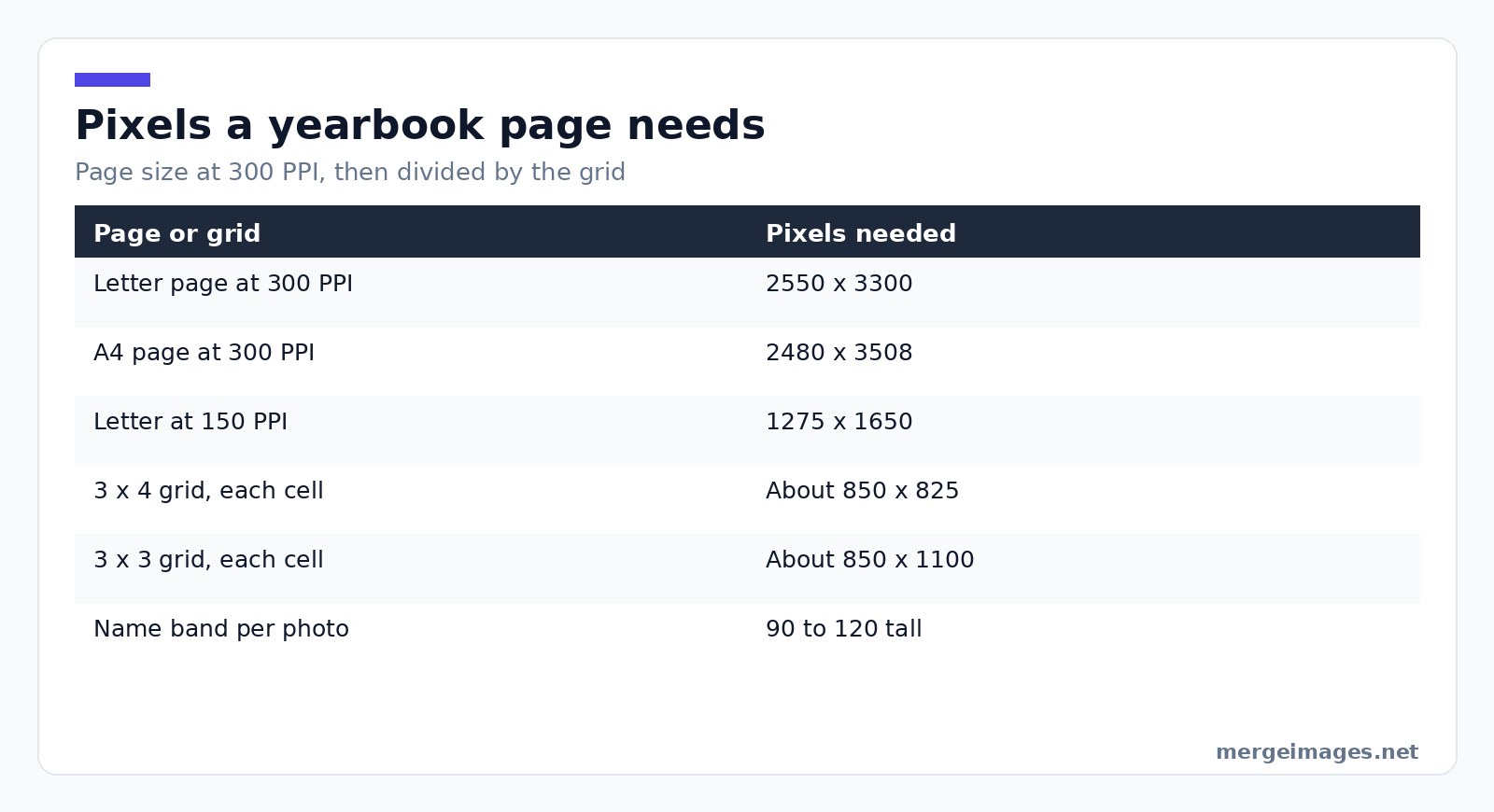
For a large poster viewed from a metre or more away, 150 PPI is genuinely fine and halves your requirement, putting a letter page at 1275 by 1650. For anything held in the hand, stay at 300. Set your output dimensions with the image resizer before export rather than letting a print service scale the file for you.
The limitation worth stating plainly: nothing recovers detail a compression pass already threw away. Enlarging a 720 pixel photo to fill an 850 pixel cell gives you a bigger soft photo, not a sharp one. Either find the original or make that photo smaller on the page.
Creative Additions
Leave room for names from the start. A band of 90 to 120 pixels under each photo, or a single strip along the page foot, is enough for a name and a year without crowding the images. Adding names afterwards to a finished collage always means covering someone's face.
School colours behind the grid, rounded corners on each cell, and the year set once in a corner will carry a page. Inside jokes age badly and quotes age worse.
Storage and Preservation
Keep the originals, the cropped set and the final export in three folders, backed up somewhere that is not the phone that took them. Export a full-resolution print master and a smaller sharing copy, because the file you drop into a group chat should never be the only one you own.
Files you send to the collage maker are processed on our own servers, deleted automatically within 7 days, and never shared or used to train models. Cropping and resizing are different: those two run on your own machine, so those images are never uploaded anywhere.
Frequently Asked Questions
What resolution do I need for a printed yearbook collage?
Multiply the printed size by 300. A letter page is 8.5 by 11 inches, so 2550 by 3300 pixels, and A4 is 2480 by 3508. Then divide by your grid to find the minimum size of each source photo: a 3 by 4 grid on a letter page needs roughly 850 by 825 pixels per image. For a poster viewed from a distance, 150 PPI is acceptable and halves those numbers.
How many photos should a yearbook collage page have?
Nine to twelve on a letter page is the practical ceiling if you want faces to stay recognisable at reading distance. Counts that form clean grids, four, six, nine and twelve, lay out far better than seven or eleven. If you have an awkward number, promote one photo to a larger feature position and grid the remainder around it rather than forcing an uneven row.
Do I need permission to use photos of other students?
For anything published by the school, the school's own consent process applies. For your own collage, ask the parents of any child who is not yours before you post it publicly or print copies for other families. Some families have safeguarding or custody reasons for declining that they are under no obligation to explain, so treat a no as final and make a version without those faces.
How do I get all the faces to line up in a collage?
Crop every portrait to identical pixel dimensions and put the eyes about one third of the way down each frame. That single habit does more than any border, background or filter. Do the cropping before you open the collage tool, because fixing alignment afterwards means re-cropping everything anyway.
Can I fix a blurry photo for a yearbook page?
Not really. Enlarging a small or heavily compressed image produces a larger soft image rather than a sharper one, because the detail was discarded when the file was compressed. The reliable fix is to find the original file from whoever took it. Failing that, place the weak photo smaller on the page where its softness is less obvious.
Before You Send It to Print
Check three things and only three. Every source photo meets the pixel size your grid demands. Every face sits on the same eye line. And every child on the page is someone you have the right to publish. The design will look after itself once those are true.

Bello builds useful software and writes thoughtful content to make sense of it all. He tests the tools himself and checks the facts before any of it goes in a guide.
Experimente Nossas Ferramentas de Imagem Gratuitas
Pronto para Experimentar?
Coloque essas dicas em prática com nosso editor de imagens online gratuito. Sem cadastro.
Juntar Imagens Agora


