
Summarise this article with:
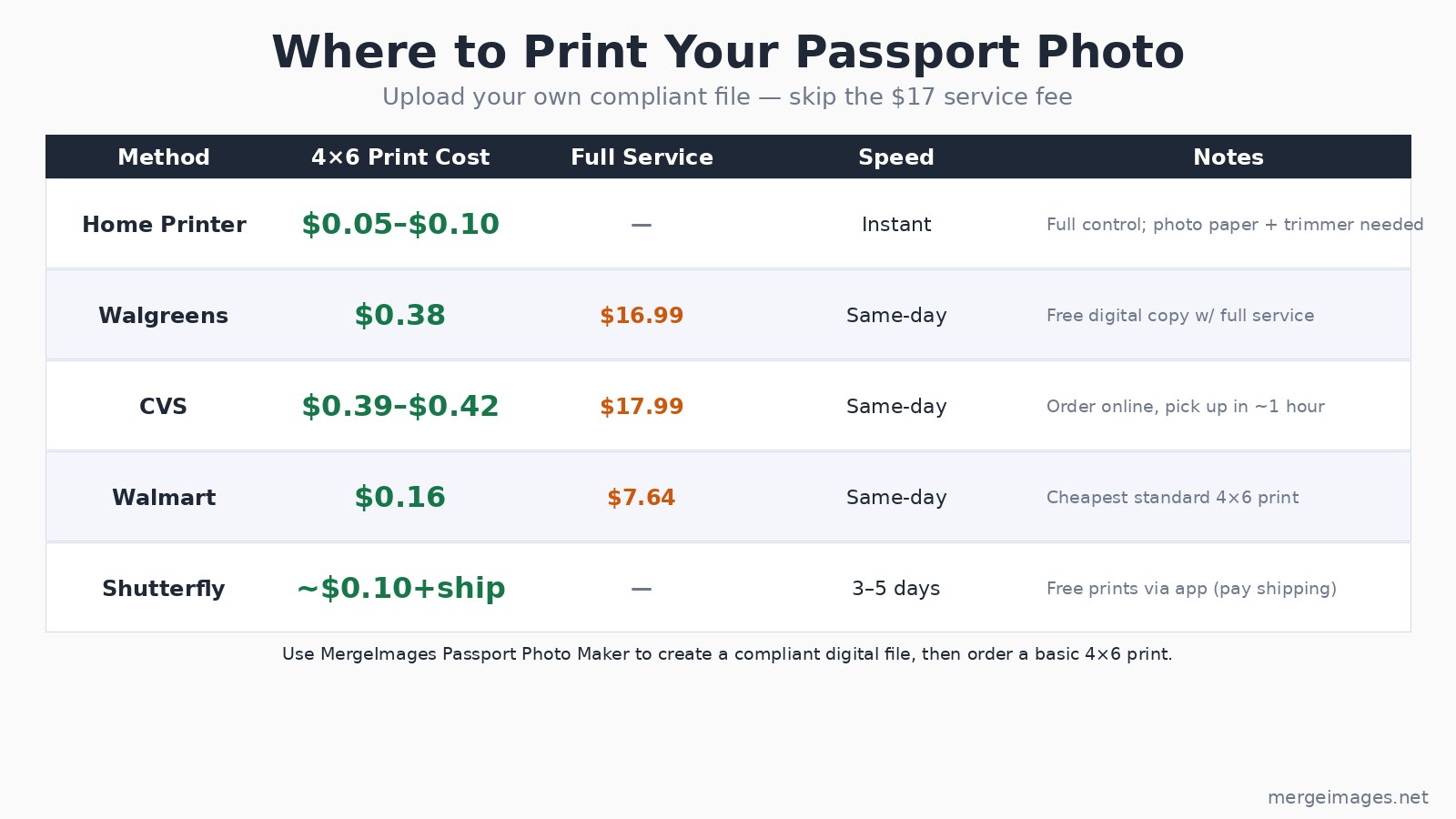
Printing passport photos at home saves real money: a Walmart 4x6 print costs $0.16 versus $7.64 for Walmart's full-service option, and $16.99 at Walgreens. The method works for US, UK, EU, and Australian passports. You need a compliant digital file first, then either a home inkjet printer or a pharmacy order. The whole process takes under 30 minutes.
Step 1: Get a Compliant Digital File
The digital photo is where most rejections happen, not the printing. Every country specifies exact head-height ratios, background colors, and minimum resolution. Getting those wrong before you print wastes paper and ink.
The Passport Photo Maker crops your image to your country's exact dimensions and checks compliance against documented government specs. It handles the geometry: for a US passport, your head must measure 1 to 1 3/8 inches tall within the 2x2 inch frame. For UK and EU passports, the face height must fall between 29mm and 34mm within the 35x45mm photo.
Download the result as a JPEG. Make sure the file is at least 600x600 pixels (300 DPI for a 2x2 inch print). That is the minimum the US Department of State specifies for print quality; lower resolution produces visible blur.
Step 2: Know Your Country's Size
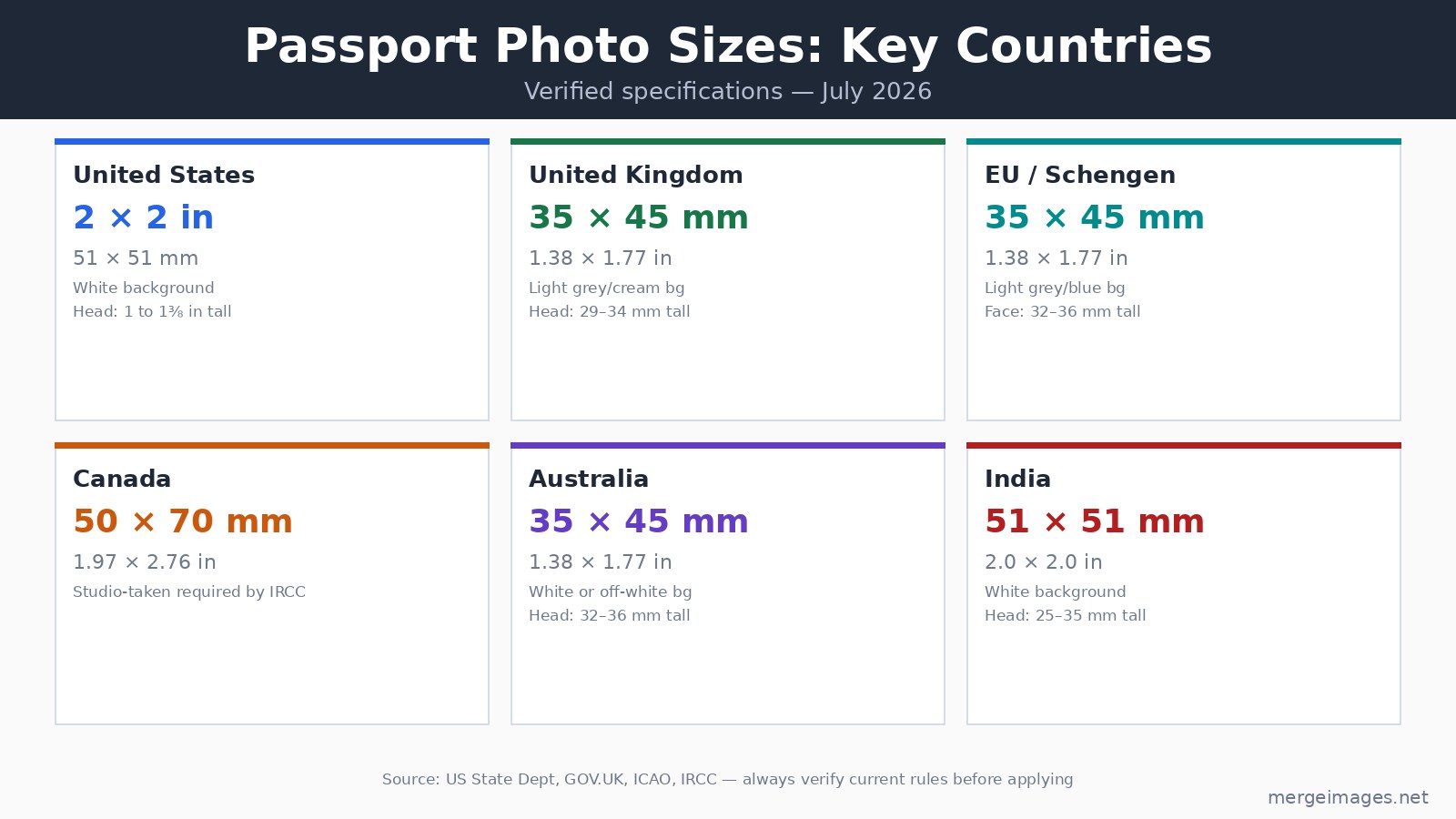
Size varies more than most people expect. The specs above are verified against government sources (July 2026):
- US passport: 2x2 inches (51x51mm), white background, head 1 to 1 3/8 in tall
- UK passport: 35x45mm, light grey or cream background, head 29-34mm tall
- EU/Schengen: 35x45mm, light grey or light blue background (plain white is commonly rejected), face 32-36mm tall
- Australia: 35x45mm, white or off-white background, head 32-36mm tall
- India: 51x51mm, white background, head 25-35mm tall
Canada's 50x70mm format is worth noting separately: IRCC requires photos to be taken by a commercial photographer. Home-printed Canadian passport photos are not accepted regardless of quality. I found this confirmed directly on canada.ca when researching this post.
For a detailed breakdown of sizes across more countries, the Passport Photo Maker lists requirements for 149 countries.
Step 3: Choose Where to Print
You have three realistic options. The right one depends on whether you own a photo printer and how soon you need the print.
Option A: Home Printer
Best if you need multiple prints or plan to reprint. The per-photo cost drops to $0.05-$0.10 once you have photo paper.
What you need:
- An inkjet photo printer (Canon, Epson, HP). Avoid laser printers for photo paper, they produce visible dot patterns and handle glossy paper poorly.
- 4x6 inch glossy or semi-glossy photo paper, 200-300gsm. Brands like Epson Premium Glossy or Canon GP-701 work well.
- A paper trimmer for clean, straight cuts. A Fiskars 12-inch trimmer costs around $12-15 and makes cutting far more consistent than scissors.
A standard 4x6 inch sheet fits 6 US passport photos (2 columns by 3 rows, exactly filling the sheet, I verified this with geometry: 2x3 = 6 photos with zero waste). UK and EU 35x45mm photos also fit 6 per sheet (2x3). Most passport photo tools include a print layout option that arranges multiple copies automatically.
Critical printer settings, these matter more than the paper brand:
| Setting | Correct value |
|---|---|
| Paper size | 4x6 in (101.6 x 152.4 mm) |
| Paper type | Photo paper / Glossy |
| Print quality | Best / Highest |
| Color management | sRGB |
| Scaling | Actual size / 100% |
| Margins | Borderless if available |
The scaling setting is the most common cause of wrong dimensions. If your printer software has "fit to page" or "scale to fit," disable it. A photo printed at 98% scaling is no longer 2x2 inches and will fail the size check.
After printing, measure with a ruler. US photos must be exactly 2x2 inches; UK and EU must be 35x45mm. Tolerance is roughly 1mm either direction.
Option B: Pharmacy Print (Under $0.42)
Best for occasional use or if you don't own a photo printer. You upload your compliant digital file and order a standard 4x6 print, not the passport photo service. The same day, you pick it up and cut it at home.
Current 4x6 print prices (July 2026, verified):
- Walmart: $0.16, the lowest cost of the major chains
- Walgreens: $0.38
- CVS: $0.39-$0.42
Compare that to the full-service passport photo price at each store: Walmart $7.64, Walgreens $16.99, CVS $17.99. The full-service option takes the photo for you. If you already have a compliant digital file, you only need their basic print service.
The upload process is the same at all three: go to the store's photo website, upload your file, select "4x6 print," choose a nearby store, and pick up within an hour or two.
For the detailed 4x6 sheet trick with exact arrangement guides, see the print passport photos at home 4x6 guide, that post covers layout templates and sheet math in depth.
Option C: Mail-Order (Shutterfly)
Best for very low cost when you're not in a hurry. Shutterfly's mobile app includes free 4x6 prints (you pay shipping only). With a small order of 10 prints, total cost including shipping runs around $4-5, roughly $0.40-0.50 per print. Larger orders bring the per-print cost lower.
Costco no longer operates photo centers. Their in-store photo departments closed in 2021 and their online photo service ended in January 2023. The old $0.12 price is no longer available.
Turnaround for mail orders is 3-5 days. This option doesn't work if your passport application has a deadline in the next week.
Getting the Cut Right
A sharp, straight cut matters. A photo with ragged edges or an incorrect dimension can be flagged during review.
Use a paper trimmer rather than scissors. Position the photo face-up and cut outside any printed guidelines rather than directly on them. Cut one edge at a time. After cutting, measure the result, especially for US passports where 2x2 inches is a strict requirement.
If the printed photo has white edges (you can see the paper base at the cut edge), the image did not extend to the paper boundary. This happens when the printer adds margins on a non-borderless setting. Reprint with borderless selected, or reposition the image on the layout so it extends slightly beyond the cut line.
Paper Finish: Does It Matter?
For most government applications, any photo-grade paper finish is acceptable. Semi-glossy (sometimes labeled satin) is the practical choice: it reproduces skin tones accurately, resists fingerprints better than high-gloss, and scans well without glare. High-gloss paper is fine but can cause reflections that make the photo harder to scan at border crossings.
Plain printer paper (75-90 gsm) is not acceptable. It absorbs ink unevenly and produces visible dot patterns. Passport processing staff can and do reject photos printed on plain paper.
Troubleshooting Print Issues
Colors look off. Set color management to sRGB in both your image editor and printer driver. Disable any "vivid" or "enhance" settings in the printer software, these alter skin tones in ways that can make a photo look processed.
Photo is blurry. The source file is below 300 DPI for the print size. At 300 DPI, a US 2x2 inch photo needs at least 600x600 pixels. If your file is smaller, run it through the image upscaler before printing. For the EU 35x45mm size, 300 DPI requires 413x531 pixels minimum (verified by calculation).
Dimensions are off. Scaling is enabled somewhere. Check the printer driver's scaling setting and also any application-level scaling (some PDF viewers scale to fit by default). Print at 100% / actual size.
Ink smears. Let the print dry 2-3 minutes before handling. Use the correct paper type setting in the driver, when the driver thinks you're printing on plain paper but you're using photo paper, it delivers too much ink and it pools rather than absorbing correctly.
Verifying Compliance Before You Print
A print is only as good as the file going in. The most common rejection reasons for passport photos are:
- Head too large or too small in the frame (head-height ratio out of spec)
- Shadows on the background or face from indoor lighting
- Background color wrong for the destination country (pure white is rejected by most EU/Schengen countries)
- Photo taken more than 6 months ago
- Any visible editing to the face (the US State Department bans software that alters appearance)
The how to prepare images for printing guide covers resolution, color profiles, and format choices in more depth if you're running into quality issues beyond the photo compliance checks.
Frequently Asked Questions
Can I print a passport photo at home on regular paper?
No. Regular printer paper (75-90 gsm) is not acceptable for passport photos at any government office. It absorbs ink unevenly, shows visible dot patterns, and has the wrong surface finish. Use photo paper at 200 gsm minimum, either glossy or semi-glossy finish.
How many passport photos fit on a 4x6 inch sheet?
Six US passport photos (2x2 inch) fit exactly on a 4x6 inch sheet with no waste, arranged 2 columns by 3 rows. UK and EU 35x45mm photos also fit 6 per sheet (70mm wide by 135mm tall total). This was verified by measurement: 6 x 2 inch = exactly 4 inches wide, 3 x 2 inch = exactly 6 inches tall.
What printer settings prevent passport photos from printing the wrong size?
Set scaling to "Actual Size" or "100%" in both your printing application and the printer driver. Disable any "fit to page," "scale to fit," or "auto-fit" options. After printing, measure the result with a ruler before cutting.
Does the pharmacy print service produce acceptable passport photos?
Yes, if you provide a compliant digital file. The pharmacy prints exactly what you upload. Order a standard 4x6 print (not their passport photo service), pick it up, and cut it at home. Walmart at $0.16 per 4x6 print is the cheapest chain option as of July 2026.
Can I use the same passport photo file for multiple countries?
Only if the specs match. US (51x51mm) and UK/EU (35x45mm) photos are different sizes and cannot be used interchangeably. Australia's 35x45mm spec matches the UK and EU dimensions, but background color requirements differ, EU Schengen specifically rejects pure white backgrounds in favor of light grey or blue.
What is the minimum resolution for printing a passport photo at home?
300 DPI is the minimum that produces sharp results. For a US 2x2 inch photo, that means at least 600x600 pixels. For a UK or EU 35x45mm photo, the minimum at 300 DPI is approximately 413x531 pixels. Below these thresholds, the print will show softness or pixelation visible to human review.

Bello builds useful software and writes thoughtful content to make sense of it all. He tests the tools himself and checks the facts before any of it goes in a guide.
Experimente Nossas Ferramentas de Imagem Gratuitas
Pronto para Experimentar?
Coloque essas dicas em prática com nosso editor de imagens online gratuito. Sem cadastro.
Make your passport photo, free


