
Summarise this article with:
The recommended Pinterest pin size is 1000 x 1500 pixels at a 2:3 aspect ratio. At that size, a simple graphic pin exports around 154 KB as a JPEG (measured with PIL), well under the 20 MB upload cap. Pinterest's algorithm displays 2:3 pins without any feed cropping on both desktop and mobile.
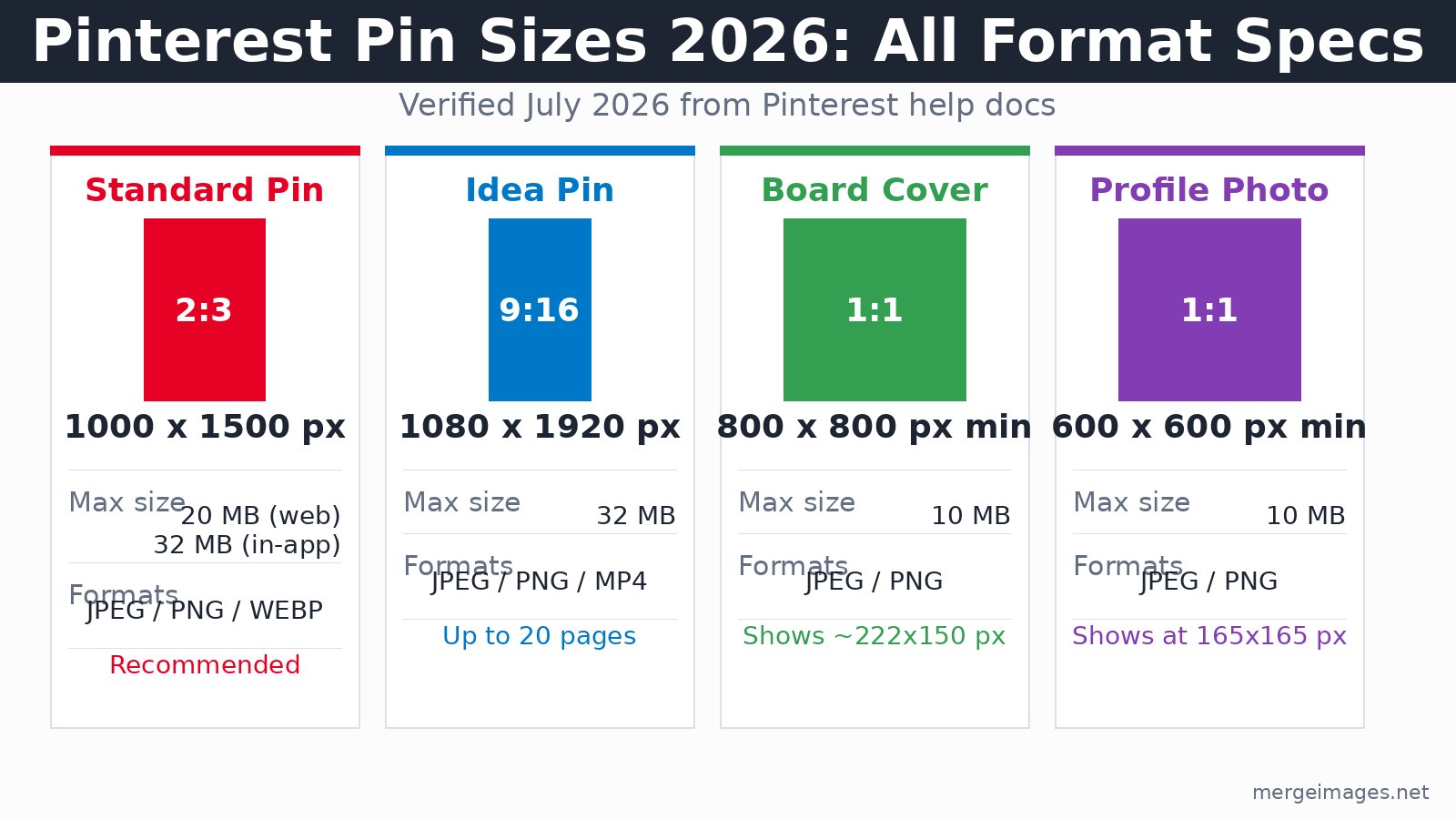
Standard Pin: the 2:3 Spec in Full
1000 x 1500 pixels (2:3) is the spec you should use for the vast majority of pins. Pinterest displays this ratio without truncation in the home feed, board view, and search results. Pins that exceed 1:2.1 (for example, 1000 x 2200) get cut off with a "show more" indicator in the feed, hiding the lower portion until a user clicks through.
The technical floor is 600 px wide, but upload below 1000 px and you'll see softness at larger feed positions, so treat 1000 px as your practical minimum.
| Ratio | Dimensions | Feed behavior |
|---|---|---|
| 2:3 | 1000 x 1500 | Full display, no truncation (recommended) |
| 4:5 | 1000 x 1250 | Full display, slightly less vertical impact |
| 1:1 | 1000 x 1000 | Full display, minimal vertical real estate |
| 1:2 | 1000 x 2000 | Full display (within 1:2.1 limit) |
| taller than 1:2.1 | 1000 x 2100+ | Truncated in feed, full on click |
File specs for standard image pins (checked July 2026):
- Formats: JPEG, PNG, WEBP, BMP, TIFF
- Max file size: 20 MB via web upload, 32 MB via in-app
- Color space: sRGB (Pinterest converts other profiles, which can cause color shifts)
Square photos work fine, but use 2:3 whenever the content allows. The extra vertical height is free real estate in a masonry grid.
Idea Pin Dimensions
Idea Pins use 1080 x 1920 pixels (9:16), the same ratio as Instagram Stories. Pinterest treats them as a distinct multi-page format: each Idea Pin can hold up to 20 pages mixing images and short video clips. The format still exists as of July 2026 per Pinterest's ad specs documentation.
The cover image, which appears in the feed and search results, gets displayed at 2:3 in most contexts. Design your first page with 2:3 framing in mind even though the full canvas is 9:16.
Design notes for Idea Pins:
- Keep text out of the bottom portion of each page to avoid overlap with Pinterest's action bar and UI chrome
- The first page functions as a thumbnail: lead with a clear value proposition
- Accepted file types: JPEG, PNG for images; MP4, MOV, M4V for video pages
- Max file size: 32 MB
For creating multi-image layouts for Idea Pin sequences, the photo collage maker lets you combine images into a single canvas you can then size to 1080 x 1920.
Video Pin Specs
Video pins accept 2:3 (1000 x 1500) and 9:16 (1080 x 1920) aspect ratios, with a maximum duration of 5 minutes (per Pinterest's pin specs page, checked July 2026, which is shorter than the 15-minute figure that was previously circulated). Pinterest's own guidance recommends 6 to 15 seconds for best completion rates.
| Spec | Value |
|---|---|
| Aspect ratios | 2:3, 9:16, 4:5, 3:4, 1:2, 1:1 |
| Duration | 4 seconds min, 5 minutes max |
| Optimal duration | 6-15 seconds |
| Formats | MP4, MOV, M4V |
| Max file size | 2 GB |
| Encoding | H.264 or H.265 |
| Frame rate | Up to 60 fps |
16:9 landscape video displays at a significantly reduced size in the feed, with letterboxing. Avoid it for organic pins.
Board Cover and Profile Photo
Board covers upload at a minimum of 800 x 800 pixels (1:1), but Pinterest crops the display to roughly 222 x 150 pixels on desktop (so center your content and keep the design readable at small sizes). Prior guides that quote 600 x 600 as the minimum are outdated.
Profile photos upload at 600 x 600 minimum and display at a 165 x 165 circle. Use a high-contrast, centered subject so it reads clearly at that tiny render size.
The Safe Zone: Where to Place Your Text
Pinterest's UI places action elements at the top and bottom of every pin. Place your headline and primary visual subject in the middle third of the canvas where nothing will cover them.
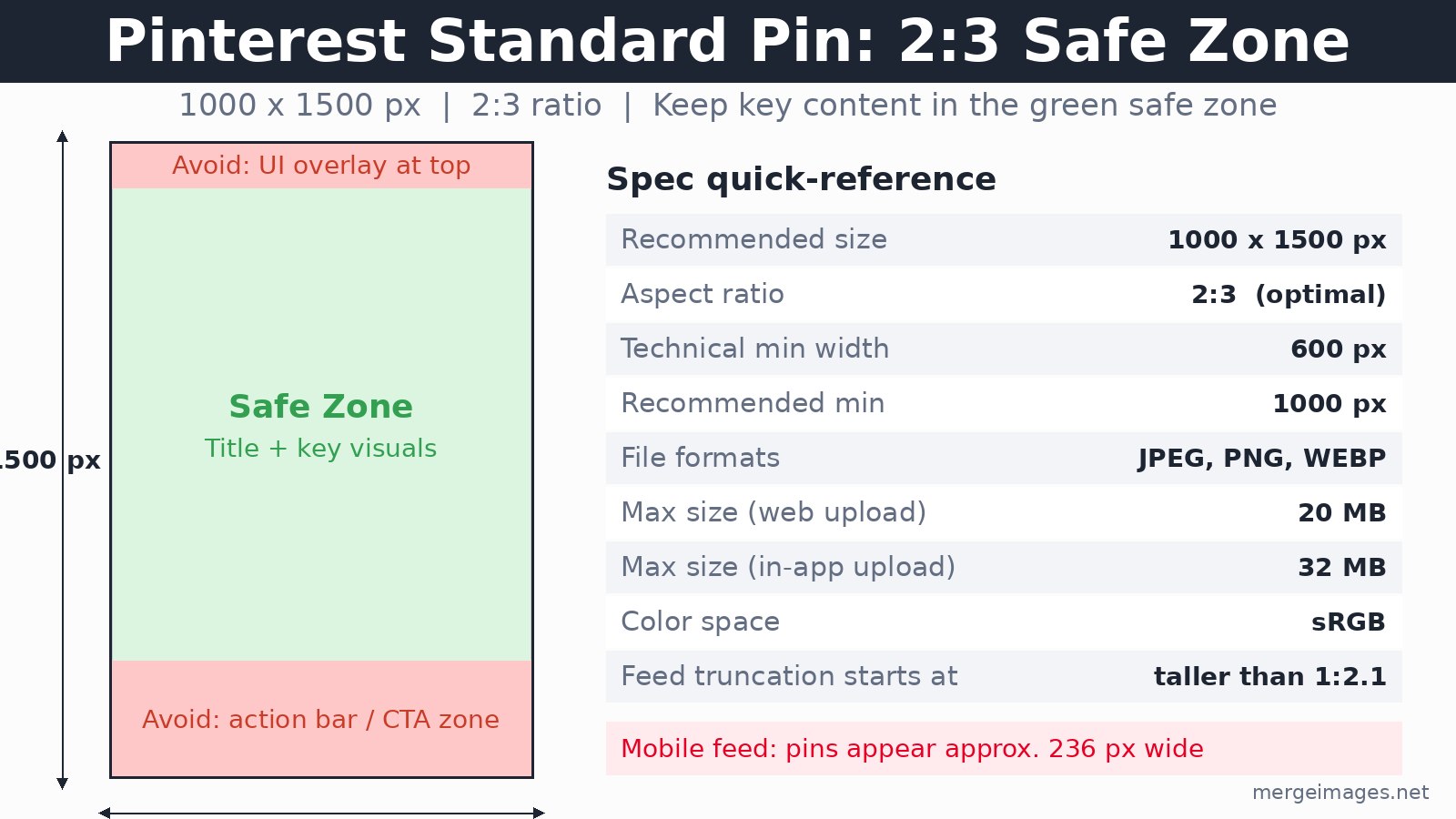
Keep this in mind for the 2:3 standard pin:
- Top area: avoid placing important text here, where Pinterest's title overlay can obscure it
- Middle: your headline, key visual, and supporting text belong here
- Bottom area: UI chrome and the action bar sit here, so treat it as off-limits for critical content
Mobile context matters too. In the two-column feed on mobile, pins render at approximately 236 px wide. Text that looks clean at 1000 px can become unreadable at that width. I always shrink a design preview to 236 px before committing to the layout.
Common Sizing Mistakes
Using Instagram dimensions. Instagram's optimal ratios are 1:1 and 4:5. Both display fully on Pinterest, but a 4:5 pin gives up vertical space compared to 2:3. Create Pinterest-specific versions of important images rather than cross-posting.
Going taller than 1:2.1. The old "giraffe pin" strategy relied on very tall pins dominating the feed. Pinterest now truncates anything beyond 1:2.1, so the content below the crop line only appears after a click.
Uploading at 600 px wide. The technical floor is 600 px, but feed positions vary by device and viewport. A 600 px upload that looked fine on one device may appear noticeably soft at a larger feed slot. Upload at 1000 px minimum.
Ignoring the board cover crop. Many creators upload a standard pin image as a board cover. Pinterest crops it aggressively to roughly 222 x 150 px for display. That wide-crop behavior means portrait-oriented images lose most of their composition. Build board covers as landscape-oriented designs even though you upload a square.
Image File Optimization
- JPEG for photos (smaller files, imperceptible quality loss at 85-90 quality)
- PNG for graphics with text (lossless, sharp edges on type)
- WEBP is now accepted and produces smaller files than JPEG at equivalent quality
- Compress files well below 20 MB even though that is the limit; a real photographic pin at 1000 x 1500 and JPEG q85 typically runs 300-600 KB depending on image complexity
- Use sRGB color space; Pinterest converts other profiles, which can shift colors
The image resizer handles precise 1000 x 1500 px output for standard pins and 1080 x 1920 for Idea Pins. For context on how Pinterest dimensions compare across platforms, see image sizes for every social media platform.
Pinterest SEO and Pin Dimensions
Dimensions affect SEO indirectly through engagement signals. A properly sized 2:3 pin that displays fully in the feed without truncation gives a viewer more to engage with. Save rate and click-through rate both feed back into Pinterest's distribution algorithm.
Relevant factors:
- Click-through rate: readable text at feed-display size drives clicks, which signal content quality
- Save rate: visually complete pins (not truncated) get saved at higher rates
- Fresh pins: Pinterest's algorithm favors new image-URL combinations over repins of the same image to multiple boards
For seasonal content: create pins 45 to 60 days before the target date. Pinterest users plan ahead, and content surfaces in search before the actual holiday or event.
If you shoot on iPhone and need to convert HEIC files before resizing, the how to convert HEIC to JPG on iPhone guide walks through the options. For carousel-style content on other platforms, Instagram carousel vs single post covers when multi-image formats win.
Frequently Asked Questions
What is the best Pinterest pin size in 2026?
1000 x 1500 pixels (2:3 aspect ratio). This is Pinterest's recommended dimension for standard image pins, verified July 2026. It displays fully in the feed without cropping and maximizes vertical visibility in the masonry grid.
What size are Pinterest Idea Pins?
1080 x 1920 pixels (9:16), the same as Instagram Stories. Idea Pins can contain up to 20 pages of images and video. The cover page displays at 2:3 in most feed contexts, so design your first page with that crop in mind.
What is the maximum file size for a Pinterest pin?
20 MB via web upload, 32 MB via the Pinterest mobile app, verified from Pinterest's ad specs documentation. A photographic pin at 1000 x 1500 and JPEG q85 typically runs 300-600 KB, so you have plenty of headroom.
What file formats does Pinterest accept for image pins?
JPEG, PNG, WEBP, BMP, and TIFF. JPEG works best for photos. PNG suits graphics with text overlays. WEBP is now accepted and produces smaller files than JPEG at equivalent quality.
Should I use vertical or square pins?
Vertical (2:3). Square pins display fully but occupy significantly less vertical space in the feed. The extra height of a 2:3 pin gives you more stopping power in the masonry scroll. Use square only when the image subject genuinely suits it, like a symmetrical product shot.
What is the minimum width for a Pinterest pin?
The technical minimum is 600 px, but treat 1000 px as your practical floor. Pins at 600 px may look soft at larger feed positions, depending on viewport size and grid column width.

Bello builds useful software and writes thoughtful content to make sense of it all. He tests the tools himself and checks the facts before any of it goes in a guide.
Essayez Nos Outils d'Image Gratuits
Prêt à Essayer ?
Mettez ces conseils en pratique avec notre outil de fusion d'images en ligne gratuit. Sans inscription.
Make your social images, free


