
Summarise this article with:
*Baby passport photo rules shift by country, but most mandate a white background, strict dimensions, and relaxed infant standards for those under 1 year. In 2026 the United States uses 2 × 2 inches (51 × 51 mm), the UK 35 × 45 mm, Canada 50 × 70 mm, and many EU states share a 35 × 45 mm size.
Why Country Rules Differ
Every nation balances border security against the reality of a squirming newborn. Some enforce adult-level strictness. Others accept that a newborn cannot hold their eyes open. You get a patchwork of size specs, background tolerances, and expression allowances.
The passport photo maker applies the correct size for each country automatically and flags compliance problems before you print.
United States Requirements
The U.S. State Department demands a 2 × 2 inch (51 × 51 mm) portrait. Even infants must fill the frame, with head height between 1 and 1⁄4 inches. Babies under one year may have their eyes closed. The background must be pure white. No hands, toys, or pacifiers. A visible parent hand is the most frequent cause of rejection.
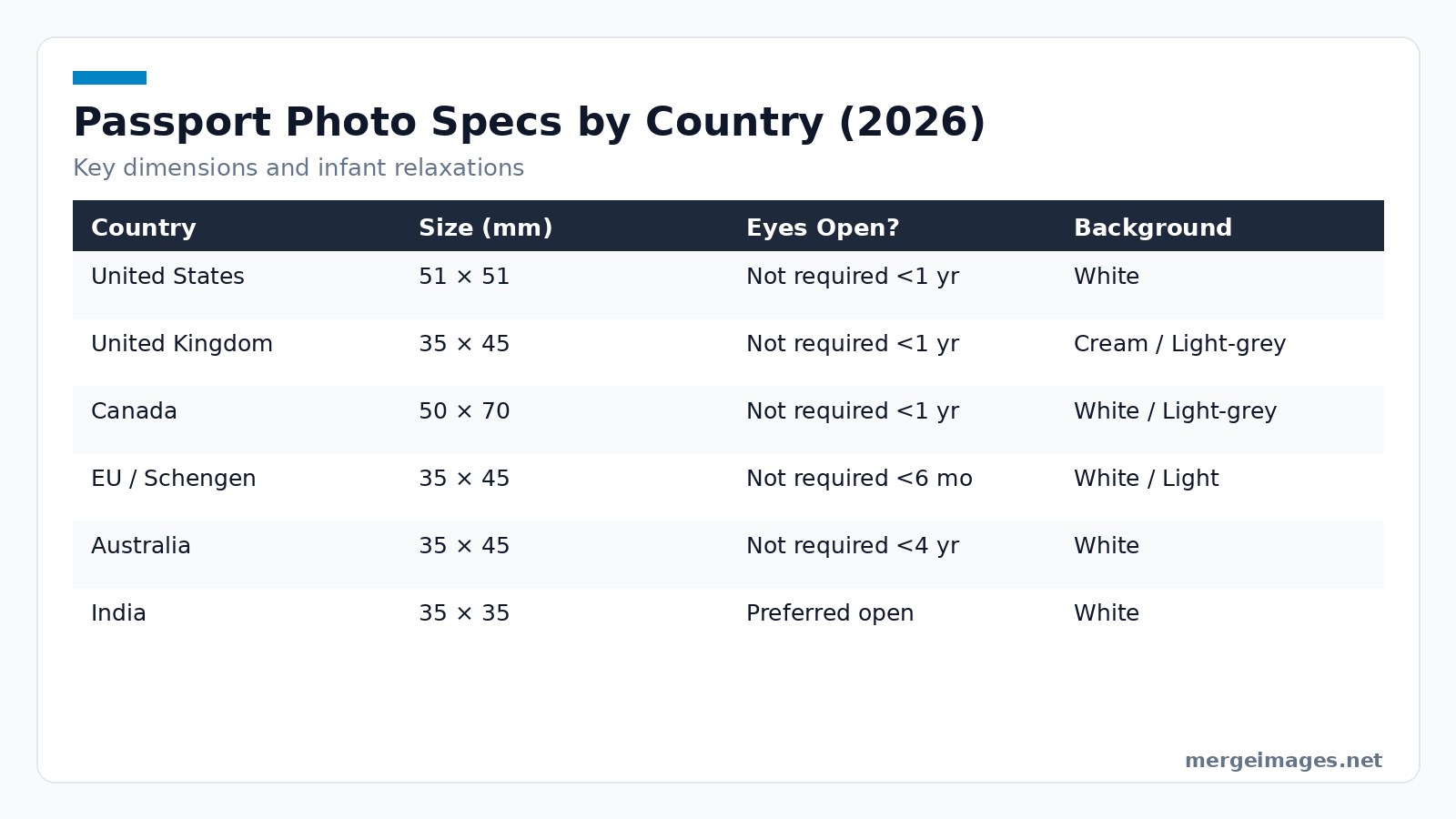
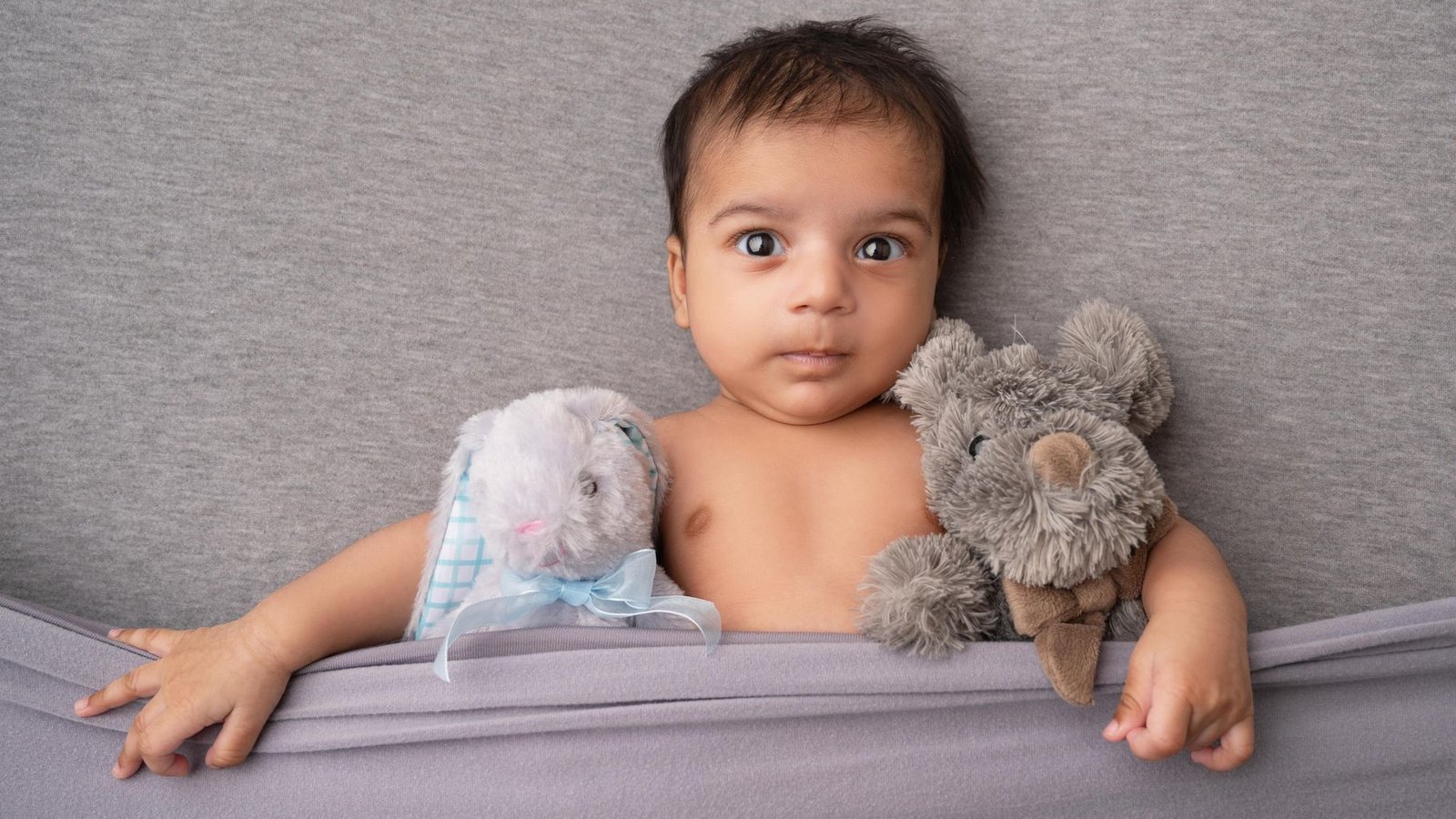
Photo: jagdeep rajput via Pexels. A cute shoot, but note: passport rules require a plain background, no props, no hands in frame. If you prefer manual control, the image cropper can hold the exact width-to-height ratio your country requires.
Practitioner Insight
Newborns squirm. Photographers often drape a blanket that blends into the background, creating a subtle shadow that automated validators flag instantly. Lay the baby on a plain white sheet. Step away. Use a remote shutter. If the baby moves, retake quickly. The system never penalizes multiple attempts. A common mistake is positioning the sheet on a carpet; the slight texture registers as a pattern and leads to a denial.
United Kingdom Requirements
British passports accept a 35 × 45 mm image on a cream or light-grey backdrop. Babies under one year skip the eyes-open rule. The child must appear alone. A supporting hand stays permissible only if completely out of view. Failure to use an approved background color leads to delays.
Limits
The UK rejects any background shading. A faint crease on the sheet triggers a refusal. Iron the sheet flat. Photograph in diffuse daylight to kill harsh shadows. Even a subtle gray tone from a nearby wall can be interpreted as a non-uniform background, so keep the shooting area free of colored surfaces.
Canada Requirements
Canadian passports require a 50 × 70 mm picture, larger than most European formats. The background can be white or light grey. The infant must remain the sole subject. A plain sheet works well. Any visible support, dummy, or toy triggers an instant refusal. The generous size often makes framing easier for parents.
Platform Guidance
Select the Canada (50 × 70 mm) preset in the /image-resizer. The tool preserves the aspect ratio automatically. It warns you if the head occupies less than 70 % of the height, a common rejection cause in Canada. When the head is too low, the validator flags the image even though the overall dimensions are correct.
European Union & Schengen Overview
Most EU and Schengen members standardize on 35 × 45 mm. Infants under six months enjoy relaxed eye-open and expression rules. Children up to five years need open eyes. Uniform white or light-colored backgrounds are mandatory. Visible supports are disallowed. Germany enforces strict background uniformity. France forgives more infant expressions. Uniformity across the bloc simplifies travel planning for families.
Practical Tip
Traveling to multiple EU countries? Use the /background-remover to create a perfectly white canvas once. Reuse it for each country's size. This eliminates the subtle hue differences that appear when shooting on different sheets.
Australia Guidelines
Australia permits children under four years to submit photos without open eyes or a neutral expression. The required size mirrors the EU standard of 35 × 45 mm. You need a white background and zero props. Sharp focus on the face is essential. Blurred images fail. Australia's lenient age threshold eases the photo-taking process for toddlers.
Common Pitfall
Australian validators check pixel sharpness. A phone's portrait mode often applies software blur. Switch to standard camera mode to retain detail. If you shoot in low light, the camera may automatically increase ISO, adding noise that the validator treats as softness.
India Specifics
India uses a compact 35 × 35 mm format. They publish no age-based relaxations. Eyes must be open. The background must be white. The baby must be centered without any visible support. The small format makes capturing a clear, open-eye shot tough. Burst-mode shooting increases the odds of a usable image.
Honest Limit
Even with burst mode, the tiny frame leaves zero margin for error. Reject the image if the baby's head is off-center by more than 2 mm. Tape a ruler to the sheet to gauge placement before shooting. Because the head occupies most of the frame, any tilt creates a shadow that the validator reads as a non-uniform background.
Japan Details
Japanese passports demand a 35 × 45 mm picture with a minimum resolution of 600 dpi. Infants under roughly one year skip the eyes-open rule. The background must be pure white. No supports. No toys. Meeting the DPI requirement is critical; lower-resolution files face automatic rejection.
Sharp Platform Guidance
Upload the raw file to /passport-photo-maker and select Japan. The tool calculates the required pixel dimensions (2100 × 2700 px for 600 dpi). It refuses to save if the source image falls short, prompting you to retake at a higher resolution. If you shoot on a smartphone set to 12 MP, you will still need to crop carefully to avoid falling below the pixel count.
Practical Workflow for a Perfect Baby Passport Photo
Create a compliant image from any browser without installing software. The AI steps below (background removal and the passport maker) upload your photo to our servers for processing, and those uploads are deleted automatically within 7 days. First, capture a series of shots using natural light and a plain white sheet as a backdrop. I uploaded a newborn picture to the /background-remover. The AI stripped the sheet behind the baby, leaving a clean white canvas ready for the next step. Next, I opened the same file in the /image-resizer and set the exact pixel dimensions required for the target country. For Japan, that meant 2100 px height to satisfy the 600 dpi rule. The tool preserved the pixel count precisely, so the image met the resolution demand without manual calculation. Finally, I fed the resized file into the /passport-photo-maker. It automatically crops to the official aspect ratio, adds the correct background color if needed, and validates the final dimensions. The result is a ready-to-upload passport photo that complies with the chosen nation's specifications.
Common Rejection Triggers
Minor oversights cause denials. A visible hand or stray toy is an instant red flag. Backgrounds that are off-white, patterned, or shadowed fail most national checks. Incorrect dimensions, even by a millimeter, trigger automatic rejection. Low resolution or excessive compression produces pixelation, especially problematic for Japan's 600 dpi rule. Facial expressions showing a smile or open mouth fail for infants in many jurisdictions, though some countries relax this.
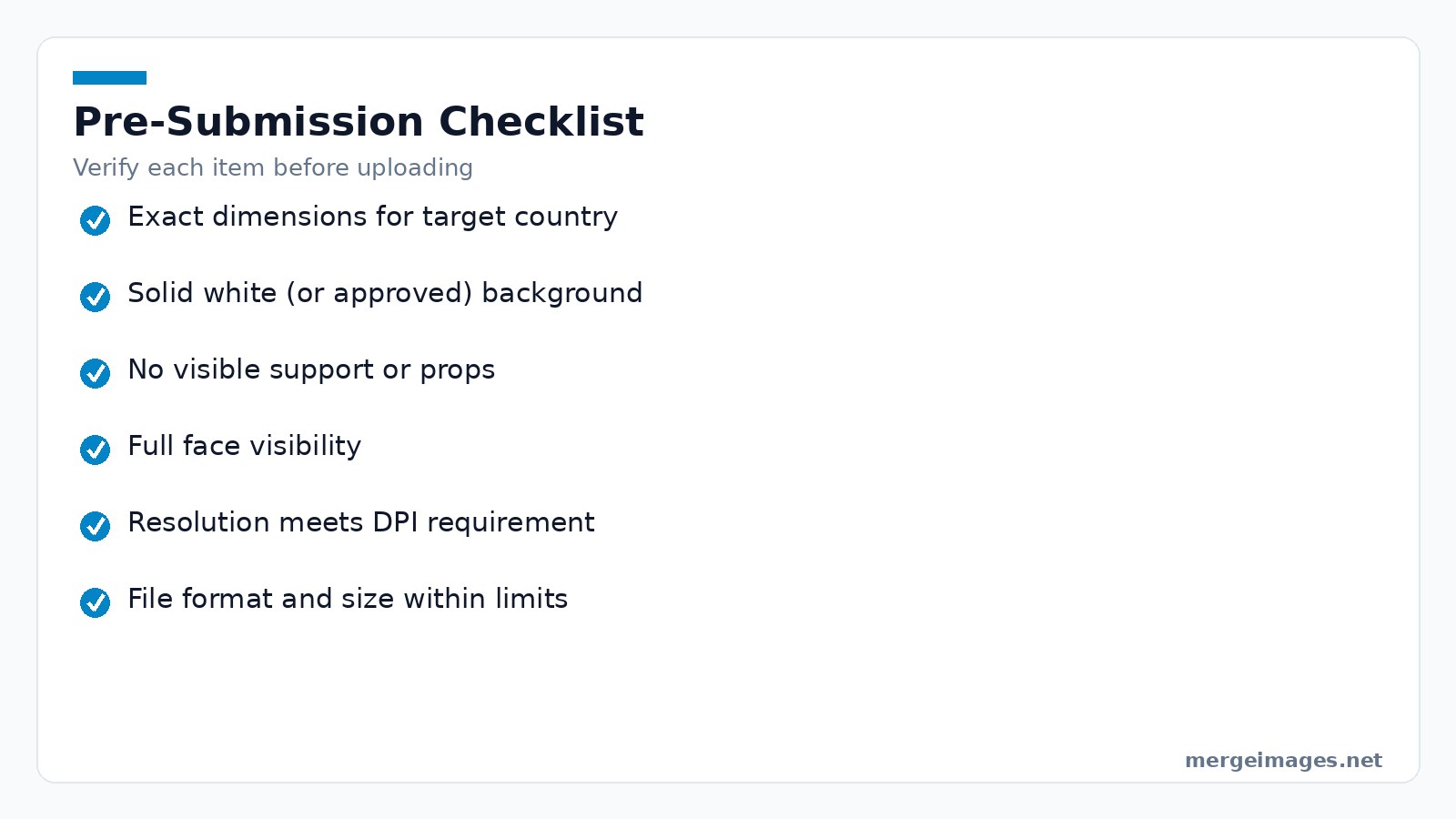
Final Checklist Before Submission
- Image matches the exact width × height for the destination country.
- Background is solid white (or approved cream/grey for the UK).
- No props, hands, or other people appear in the frame.
- Baby's face occupies the required portion of the photo and is fully visible.
- Resolution meets or exceeds the minimum DPI requirement.
- File format is JPEG or PNG and stays under the size limit for online uploads.
Frequently Asked Questions
How many photos should I take before editing?
A handful of shots, five to ten, usually yields at least one that meets eye-open and framing criteria.
Can I use a smartphone camera?
Yes, as long as the image is high-resolution and you avoid digital zoom.
Do I need to print the photo or can I submit it digitally?
Most authorities now accept digital uploads; check the specific portal for file-type limits.
What if the background isn’t perfectly white?
Use the /background-remover tool to replace it with a pure white canvas before resizing.
Is there a way to verify dimensions before uploading?
The /passport-photo-maker automatically validates size and aspect ratio for supported countries.

Bello builds useful software and writes thoughtful content to make sense of it all. He tests the tools himself and checks the facts before any of it goes in a guide.
Prueba Nuestras Herramientas de Imagen Gratuitas
¿Listo para Probarlo?
Pon estos consejos en práctica con nuestro editor de imágenes online gratuito. Sin registro.
Make your passport photo, free


