
Summarise this article with:
A meme is two or three images stacked into one file with a caption that has to survive being read at thumbnail size. Build it at 1080 pixels wide or more, set the caption around 96 px with an outline turned on, and keep the file under the 5 MB ceiling X enforces. The format decides the joke as much as the images do.
Anatomy of a Meme
Almost every meme that works does the same three jobs. One image sets up a situation, a second delivers the turn, and the text tells you how to read the pair. Drop any one and the joke needs explaining, which means it stops being a joke.
Merged images do this well because they are fast: two panels make a comparison without saying it out loud, and that is most of the humour. What you are building is one flat file, not a carousel, because a flat file is what gets screenshotted and reposted.
Popular Meme Formats
Side-by-side pairs are the workhorse: expectation versus reality, how it started against how it is going, what you ordered next to what arrived. Two panels of equal width merged horizontally, captioned over each half or across the bottom. Equal width matters more than it sounds, because an uneven split reads as an accident.
Photo: Ketut Subiyanto via Pexels
Vertical stacks carry sequence. Top panel, bottom panel, the eye moves down in the order you intended. That is the shape for escalating reactions and anything with a punchline that has to land second. Merge them with the vertical image merge so the panels share a width and the seam sits straight.
Multi-panel grids are comic-strip logic. They ask more of the reader, so they have to be funnier to earn the extra second, and they get small fast on a phone, which is where captions die. The photo collage maker handles the layout past two panels.
Creating Meme Images
Finding Source Material
Your own photos and screenshots are the safest source and usually the funniest, because nobody has seen them. Stock is fine if the licence allows modification. Screenshots of other people's content are the grey area, which the legal section below covers.
Using Our Image Merger
Upload your panels, choose horizontal or vertical, set the spacing, download one file. What you upload is processed on our own servers, deleted automatically within 7 days, and never shared or used to train models.
One thing that saves rework: crop panels to the same height before merging horizontally, or the same width before merging vertically. Mismatched panels either letterbox or stretch, and stretched faces are the tell that an image was thrown together.
Adding Text
The meme generator does the caption alongside the image: templates by category, draggable text boxes, the usual meme fonts including Impact, an uppercase toggle, colour, alignment, quick top and bottom positions, and a per-box outline. That outline is drawn at 8 percent of the font size, which is why it holds up when the image is scaled down in a feed.
If the caption is going on a single photo rather than a panel stack, add text to image is the shorter path.
Design Tips
Text size is where most homemade memes fail, and it fails invisibly, because you see the image full screen while your audience sees it at a third of that. The first meme I built with our generator was a two-panel pair at 1080 x 1350 with the caption at 56 px, which looked fine on the canvas and was mush on my own phone. At 96 px it read instantly. On a 1080 pixel wide canvas, anything under about 90 px is a gamble.
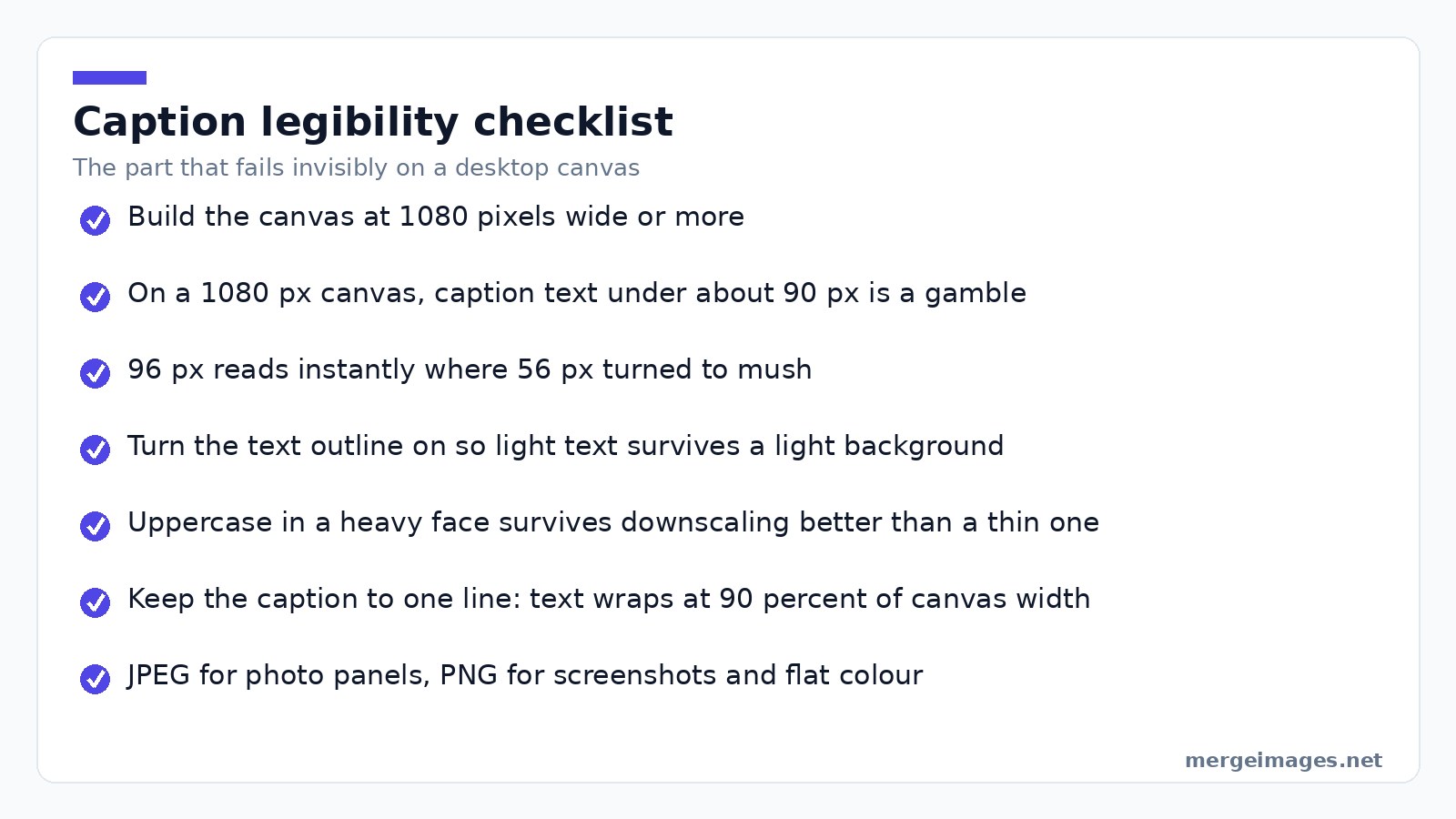
Turn the outline on, always. White text over a bright patch of sky disappears without it and you will not notice until someone tells you. Uppercase in a heavy face also survives downscaling better than a thin one, which is the real reason Impact became the default.
Keep the caption to one line. Our generator wraps text at 90 percent of the canvas width, so a long caption becomes three lines and eats the image. Cut words rather than shrink type. Export photo panels as JPEG and anything with flat colour or screenshot text as PNG, because JPEG leaves visible fuzz around hard-edged glyphs.
Timing is not systematisable: a format that is funny in March is exhausted by June, while the two-panel comparison ages fine.
What Our Meme Generator Will Not Do
It renders a still image and exports PNG or JPEG. That is the whole output: no animated GIF, no video, no way to burn a caption onto a clip. If the joke needs motion, this is the wrong tool and you want a video editor.
It also will not write the joke, pick the template, or tell you a format has aged badly. Those are the parts that decide whether anyone shares it.
Platform Optimization
X publishes formats and weight rather than dimensions. Its media documentation lists JPG, PNG, GIF and WEBP as supported, caps a still image at 5 MB and an animated GIF at 15 MB. No recommended pixel size is published, so build for legibility and stay under the ceiling.
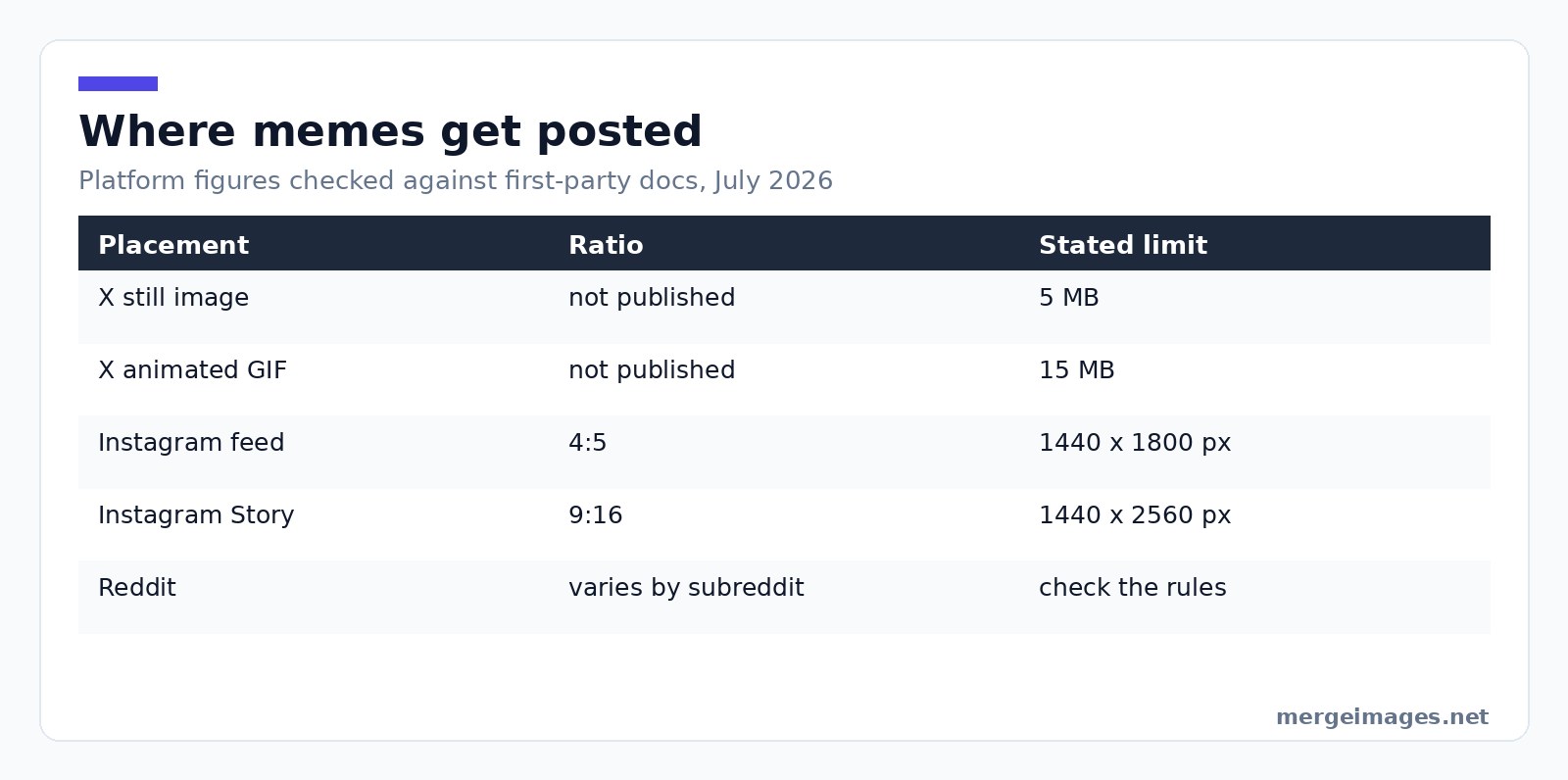
Instagram gives a 4:5 portrait more vertical feed space than a square, and Meta's placement guidance puts that at 1440 x 1800 pixels. Stories and Reels are 9:16, which Meta gives as 1440 x 2560. A square meme still posts, it just occupies less screen.
Reddit is where the subreddit's rules outrank any general advice. Some ban image macros outright, some require a title format, and the ones that allow memes reward higher-resolution uploads because people open the image rather than glance at it.
TikTok is video-first, so a still meme usually appears as a slide inside a clip, with text kept large and clear of the interface along the bottom and right edges.
Legal and Ethical Considerations
Fair Use
The U.S. Copyright Office's Fair Use Index is the source worth reading. Fair use is decided case by case on four factors: the purpose and character of the use, the nature of the work, how much you used, and the effect on the market for the original. Transformative uses, ones that add something with a different purpose, fare better. The Office is explicit that there is no formula and no safe percentage, so anyone quoting a fixed rule is guessing.
Avoiding Issues
Commercial use raises the stakes on the first factor, so a meme in an ad is a different conversation from one on a personal account. Photos of identifiable private people carry a separate problem that has nothing to do with copyright. A meme that punches at a person rather than a situation is usually both the riskier one and the less funny one.
Going Viral
Nobody can manufacture this, and anyone claiming otherwise is selling something. What is observable is that memes travel when people recognise themselves in them, and specific beats universal: a joke about one particular annoying thing spreads further than a joke about life.
Test before you post. Send it to two or three people who will tell you it is not funny. If it needs a sentence of explanation in the message, it is not finished.
Try it hereOpen the image mergerMerge two photos in secondsCombine images side by side or stacked, free, no login.
Frequently Asked Questions
What size should I make a meme?
Build at 1080 pixels wide or more so it survives a platform re-encode. For Instagram, 4:5 at 1440 x 1800 uses the most feed space. X publishes no dimensions, only a 5 MB ceiling per image. A square works everywhere and wastes a little screen, a fair trade if one file goes to several places.
Why is my meme text unreadable on a phone?
Almost always because it was sized on a desktop canvas. On a 1080 pixel wide image, a caption under about 90 px gets hard to read once a platform scales it into a feed. Turn the outline on so light text survives a light background, keep the caption to one line, and check it at thumbnail size before posting.
Can I make an animated GIF meme with your tools?
No. The meme generator outputs a still PNG or JPEG only, and the merge tools produce a single flat image. For animation you need a video editor or a dedicated GIF tool. X does accept animated GIFs up to 15 MB if you build one elsewhere, so the file will post, we just cannot make it.
Is it legal to use a screenshot from a film or TV show?
It depends, and the U.S. Copyright Office says so plainly: fair use is decided case by case on four factors, with no fixed threshold. Commentary, criticism, and uses that transform the original rather than substitute for it sit better. A meme on a personal account is a different risk profile from the same image in a paid ad.
Should I export as PNG or JPEG?
JPEG for photographic panels, PNG for flat colour, screenshots and anything with hard-edged text. JPEG compression leaves visible artefacts around sharp glyphs, which shows up badly on screenshot memes. If the file is near a platform ceiling, high-quality JPEG is usually the better trade.
One Last Thing
The mechanics take half an hour to learn and then stay learned: equal panels, one flat file, big outlined caption, right ratio for the destination. Knowing which two images belong next to each other is not a process. Build the boring part fast so you have attention left for the part that matters.

Bello builds useful software and writes thoughtful content to make sense of it all. He tests the tools himself and checks the facts before any of it goes in a guide.
Essayez Nos Outils d'Image Gratuits
Prêt à Essayer ?
Mettez ces conseils en pratique avec notre outil de fusion d'images en ligne gratuit. Sans inscription.
Make your social images, free


